Mission Control
From low adoption to the first click of every workday
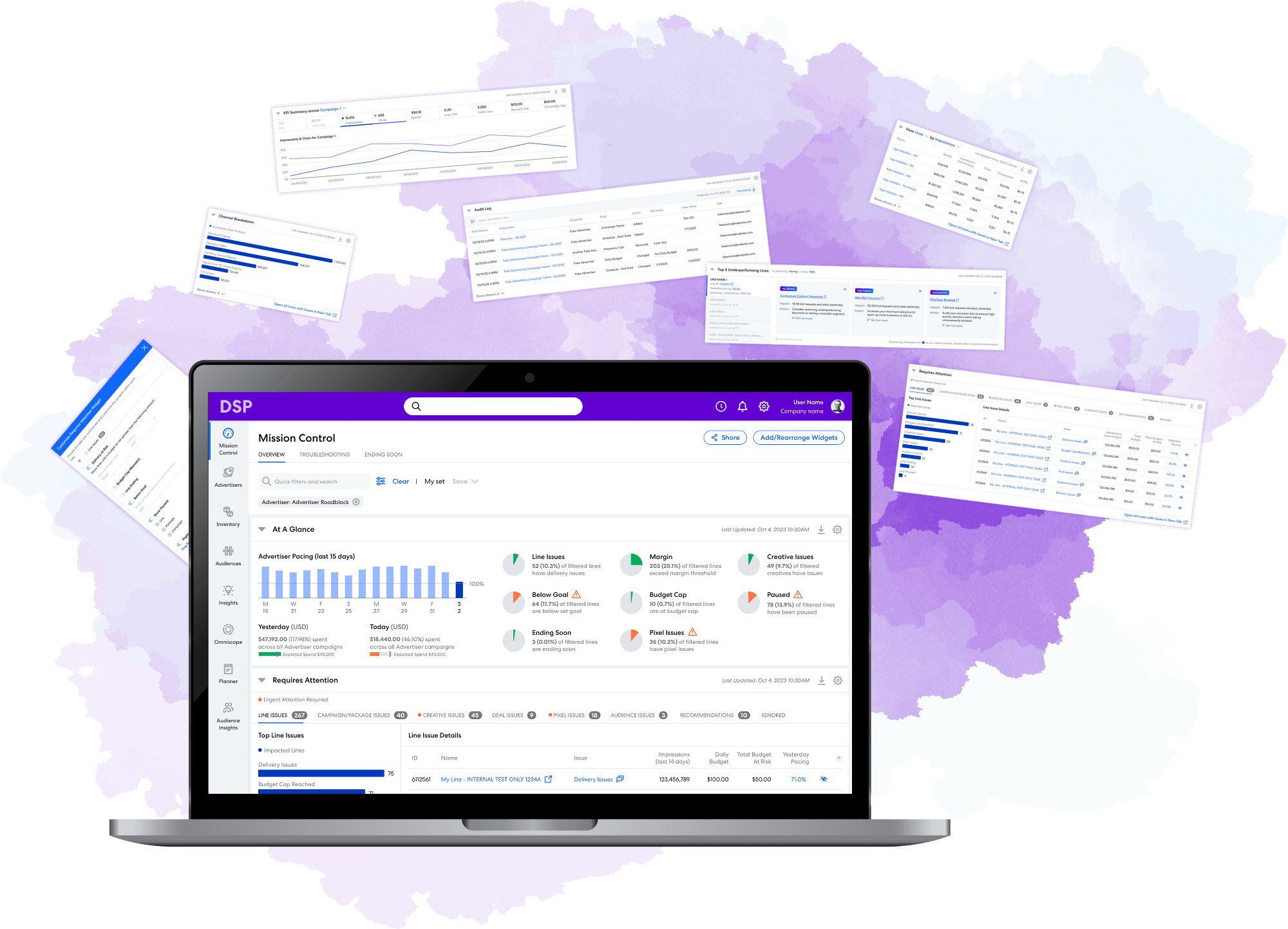
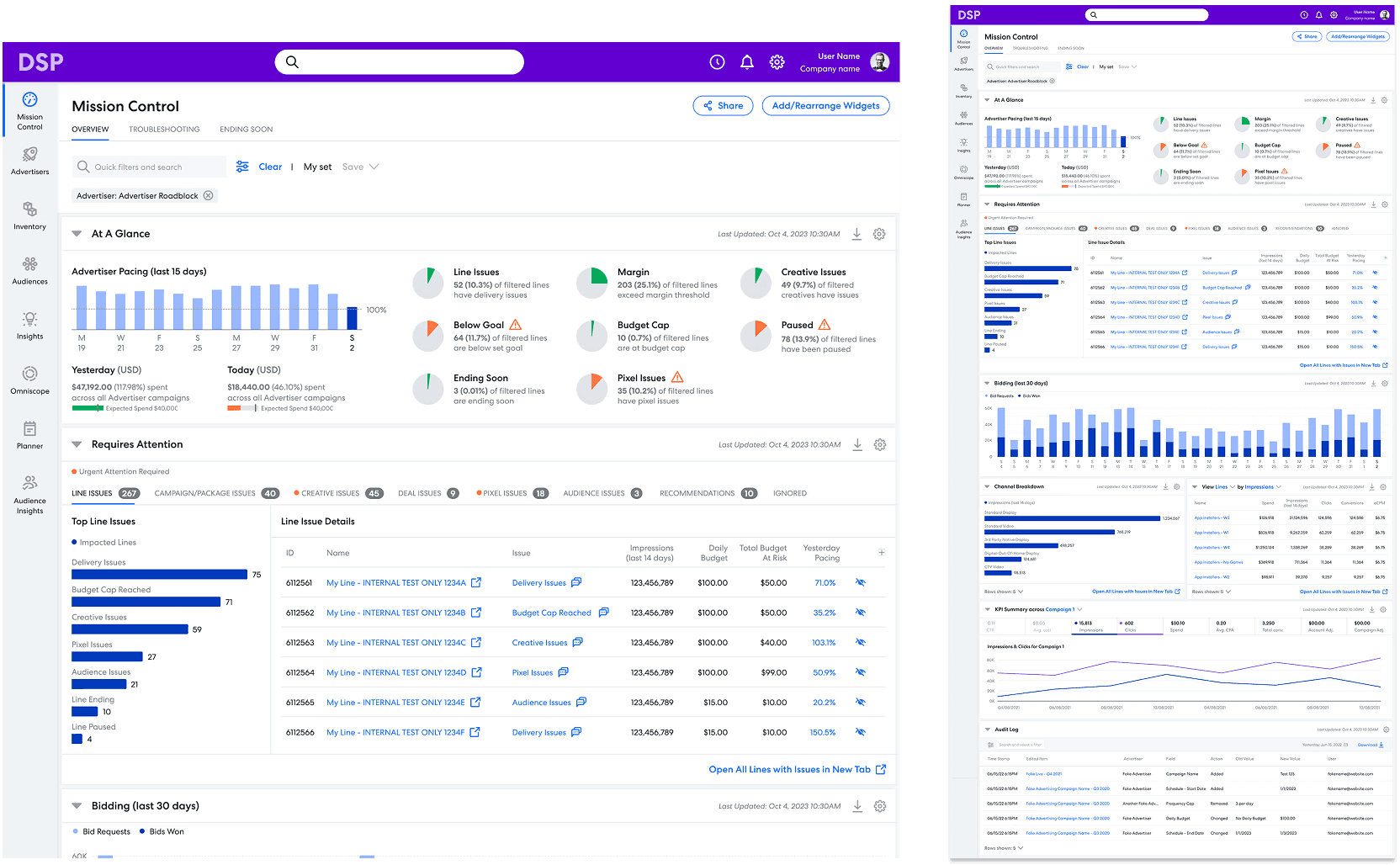
An interactive, highly customizable landing page that gives ad campaign managers a real-time view of all active campaigns in one place. Built with drag-and-drop sections, it became the central hub for monitoring performance and launching daily workflows.
Case Study Overview
Impact: A new hub for daily workflows
100% of core daily workflows now originate from the new landing page, up from 0%, establishing it as the primary entry point for daily use
4.6x increase in engagement, with 85% of users interacting with landing page content daily (versus 15% previously)
40-60% fewer steps for common workflows, reducing repetitive daily tasks from 5-7 clicks to 1-3.
Old (Pre-existing Design)
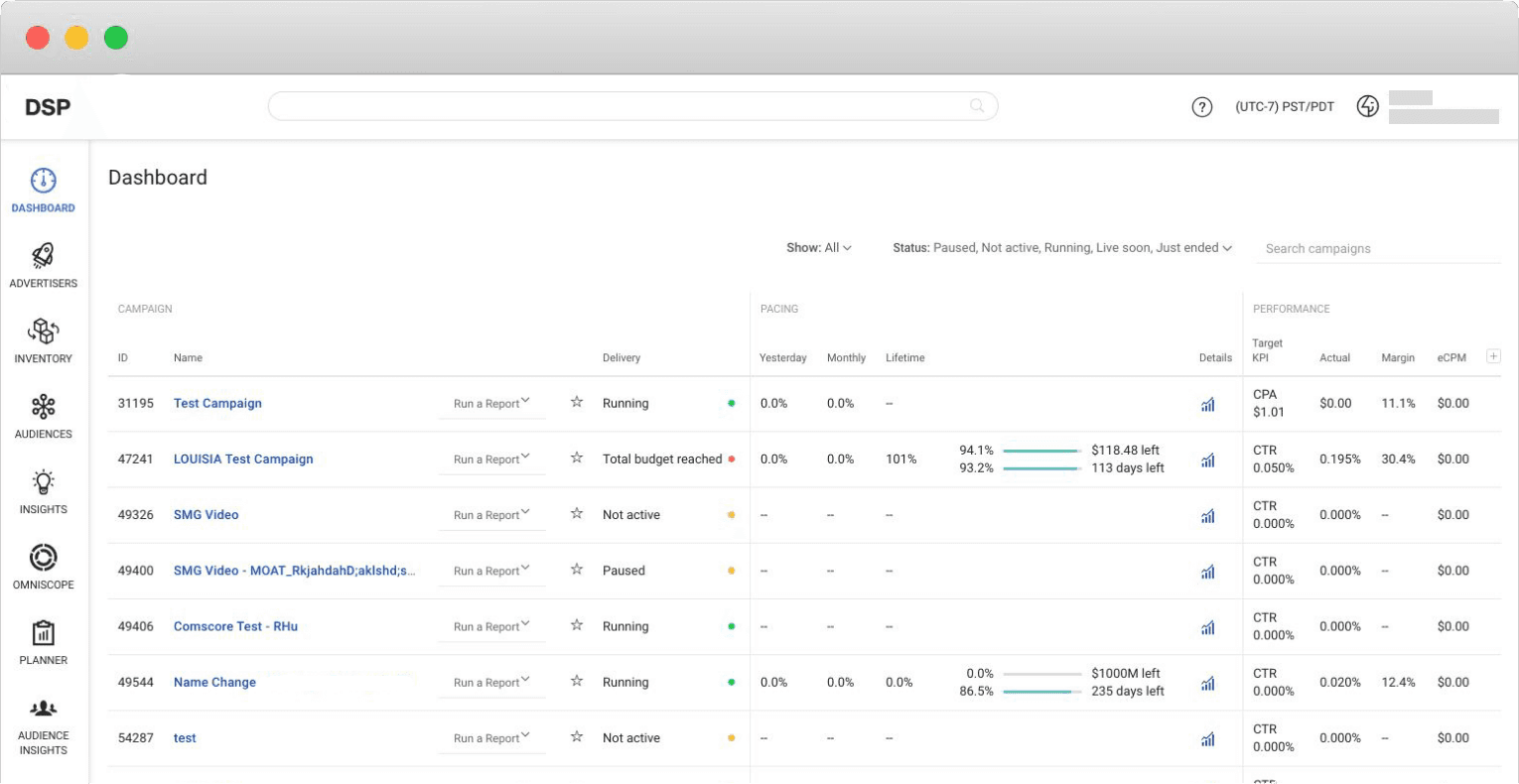
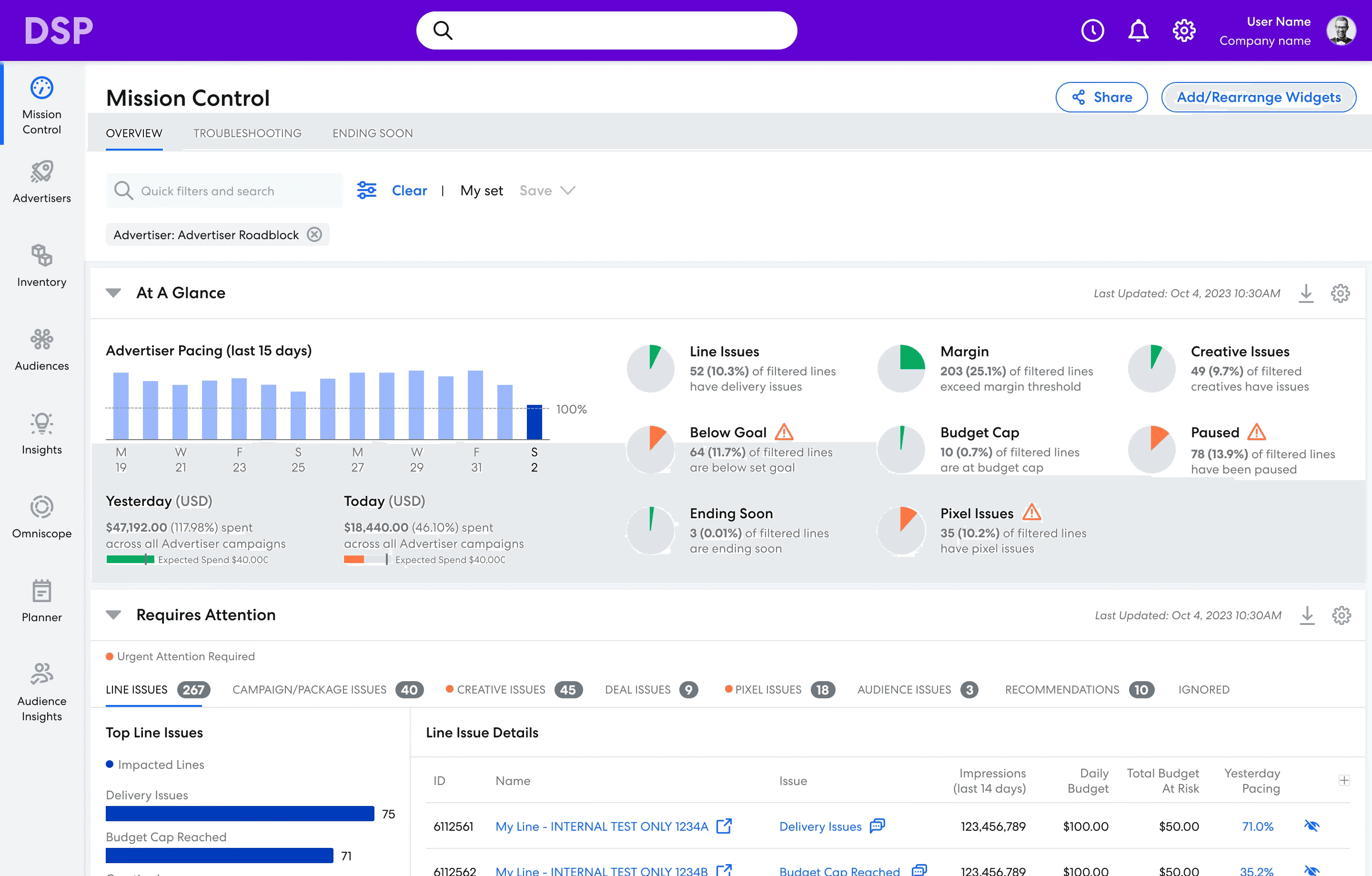
New (My Redesign)
My Role
Owned end-to-end design, from research synthesis to final mocks and interaction flows. Mentored a junior designer through early ideation (2020–2021)
Timeline
Design: May 2020 – Aug 2021
(Paused for two years)
Development: Sep 2023 – Dec 2023
Team Size (2020)
2 Designers, 1 Product Manager, 1 UX Researcher
Team Size (2023)
1 Designer, 1 Product Manager, 1 UX Researcher, 1 Tech Writer, ~30 Engineers
The Challenge
Business Problem: High friction and poor first impressions drive user churn
User experience is a retention driver, according to customer surveys.
A high-friction entry point impacts all core workflows, slowing down daily use.
The landing page is the highest-impact surface, shaping expectations for the whole platform.
User Problem: Landing page doesn't support core workflows
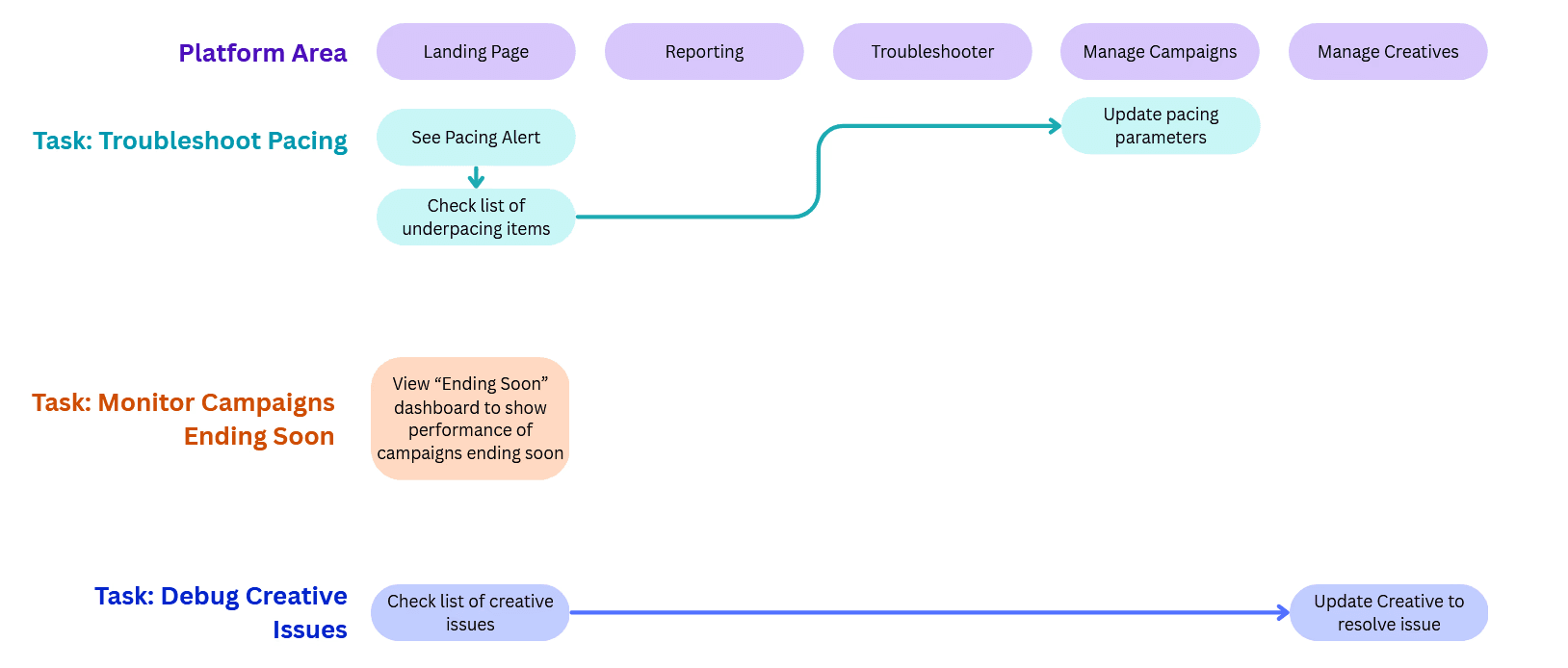
Core tasks are buried in navigation, causing users to bypass the landing page.
Critical data is locked in reports, not surfaced where it’s needed.
A new landing page could streamline daily flows, reducing steps and improving efficiency.
The old landing page (not my work)
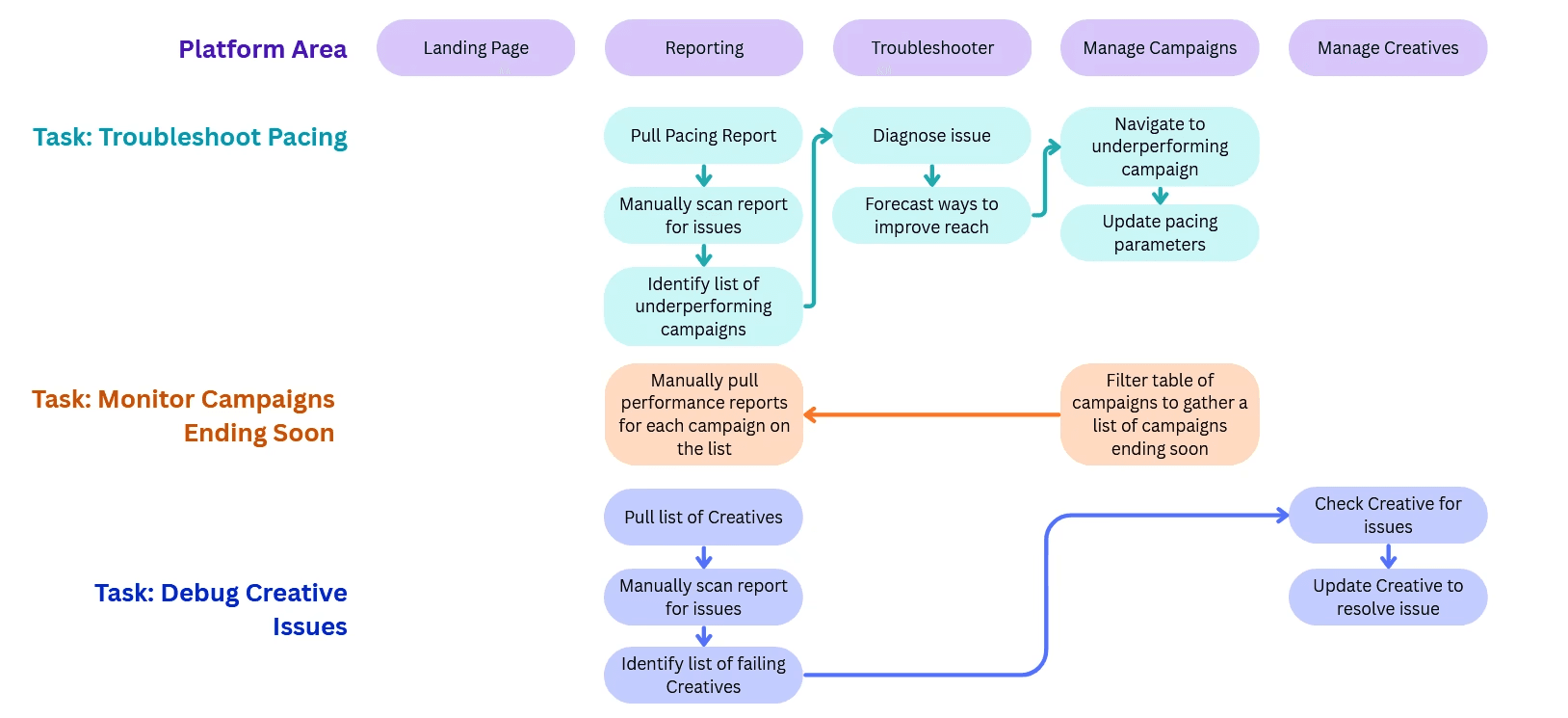
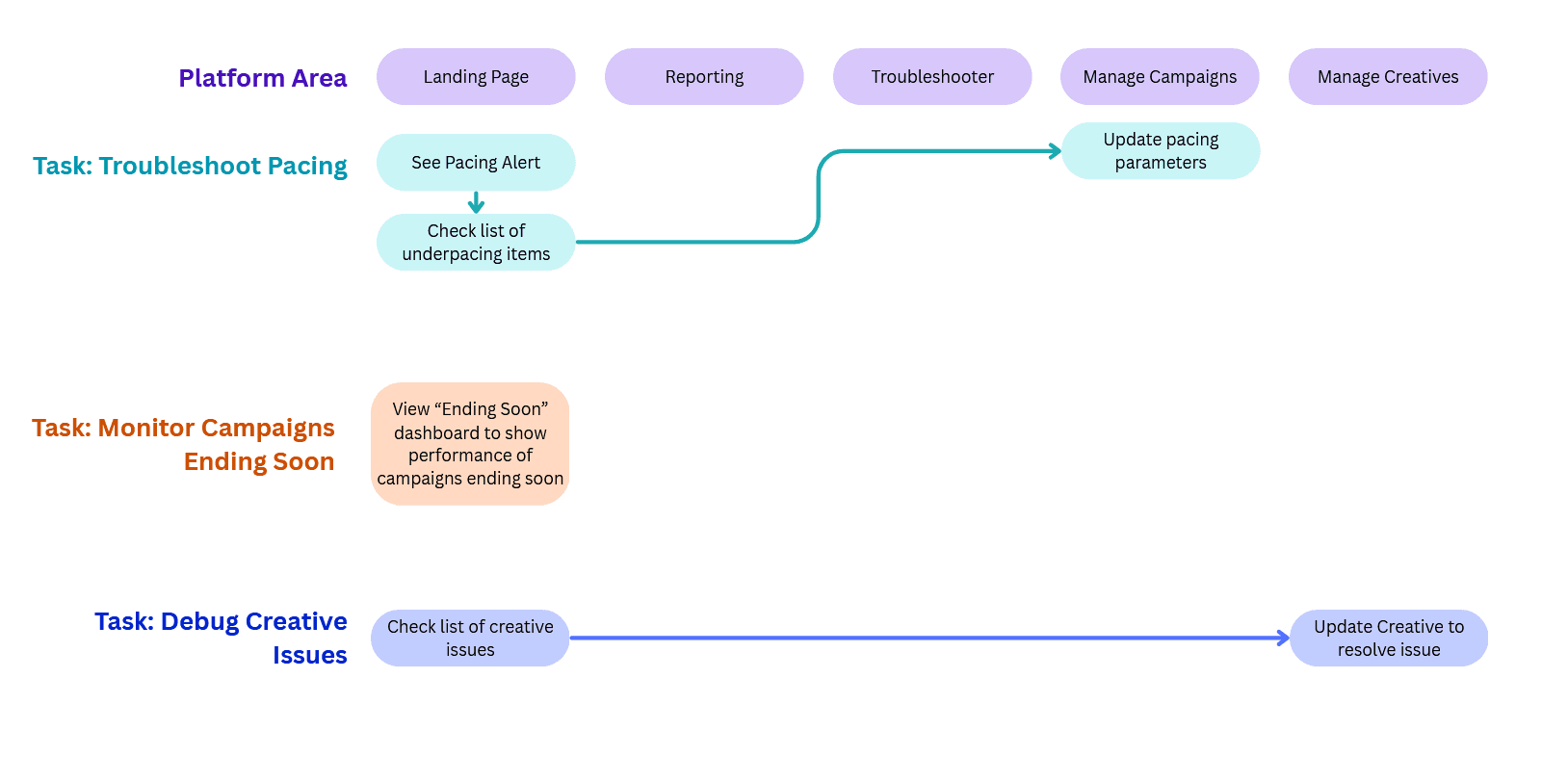
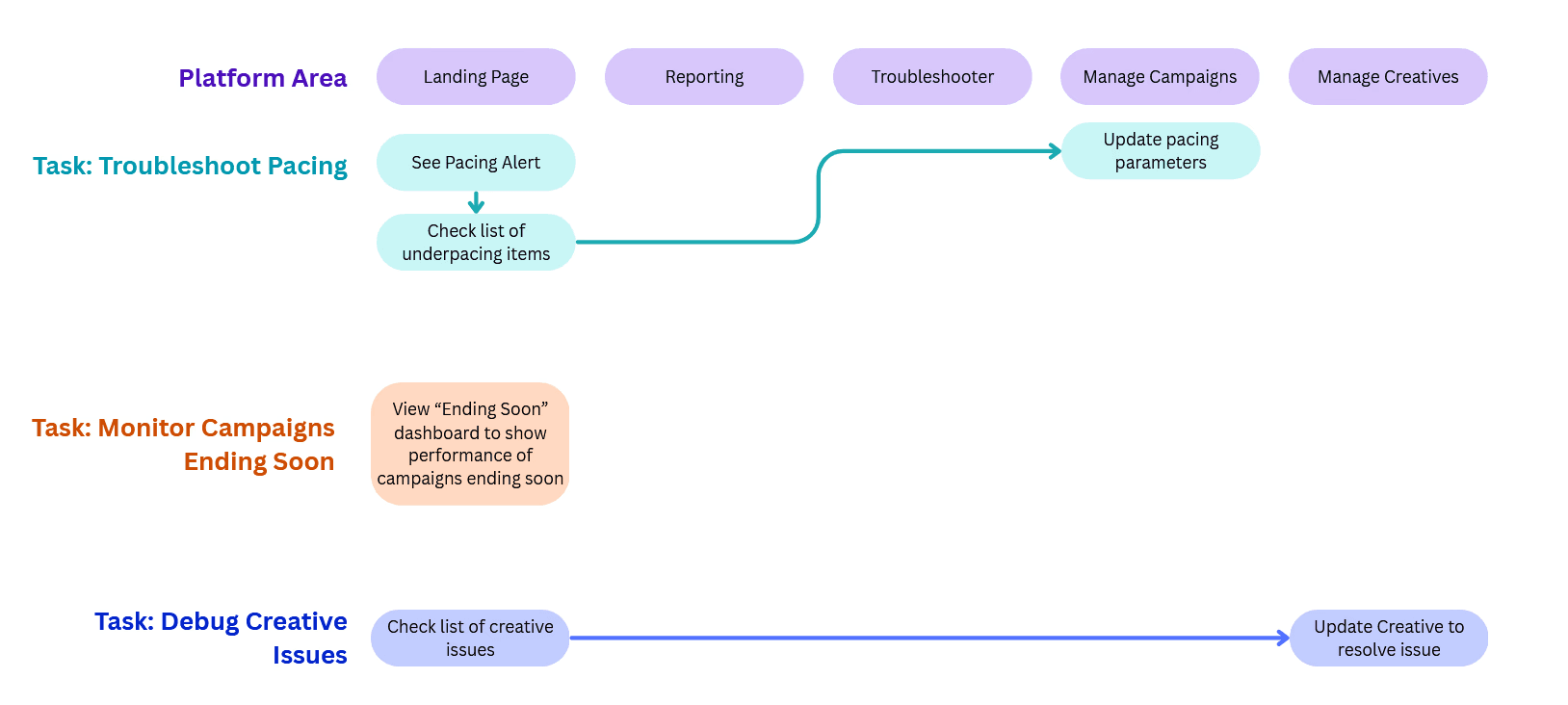
Example User Journey Map that illustrates a few core workflows
My Solution
Mission Control: A launchpad that keeps users informed and gets them where they need to go
Shows all the information a campaign manager needs upfront with easy-to-read visuals.
Is fully modular and customizable, with the ability to save and share dashboard views.
Provides upfront access to all core platform workflows and guides them towards task completion.
Solving the Workflow Problem
Positions the landing page as the primary entry point for daily use.
Surfaces key metrics upfront, eliminating the need to pull reports to complete core workflows.
See more in the Impact section at the end of the case study.
Feature Highlight: Threshold Customization
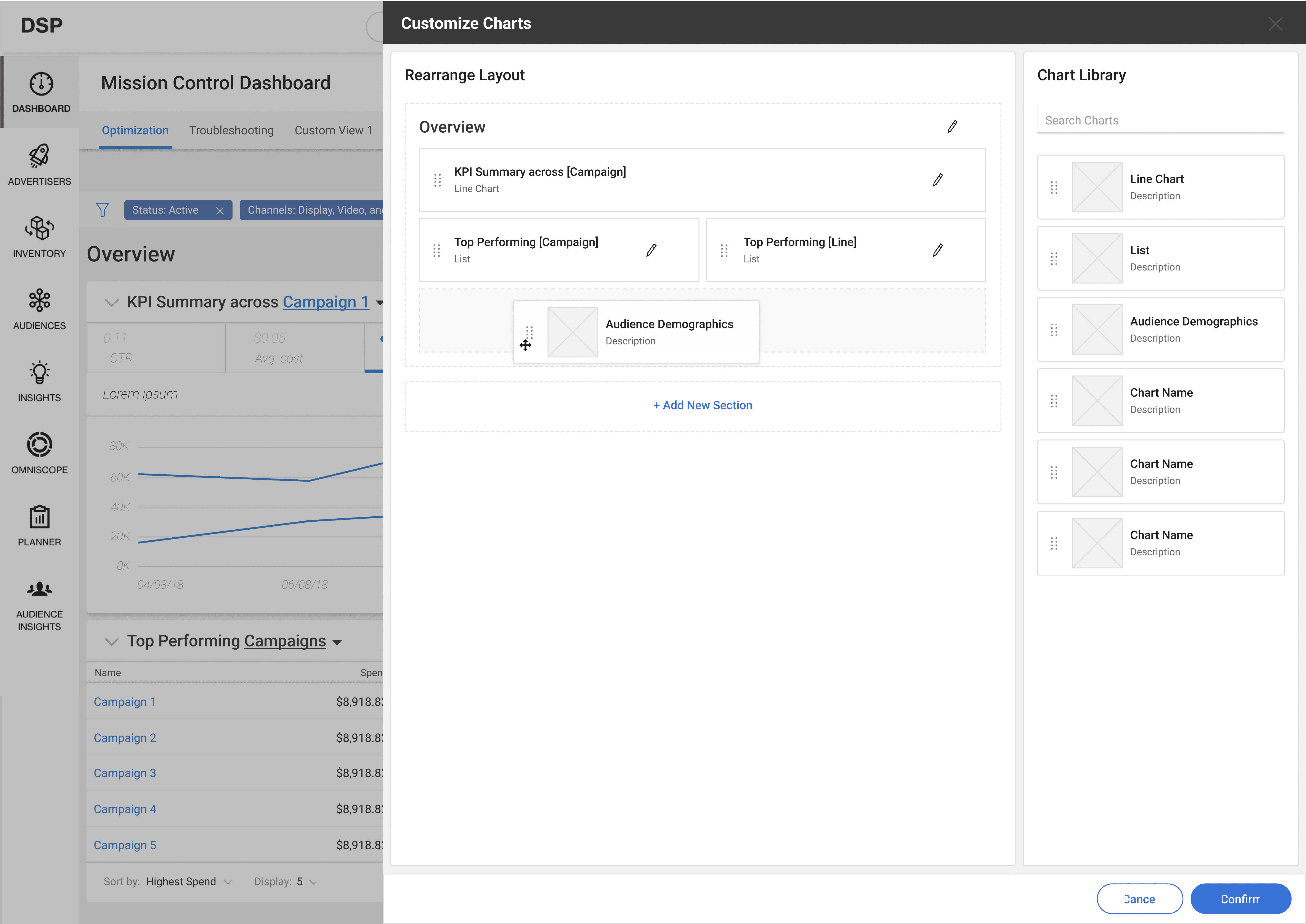
Every campaign manager has different criteria for what constitutes an issue. Each widget has fully customizable settings for which issues to show, and when.
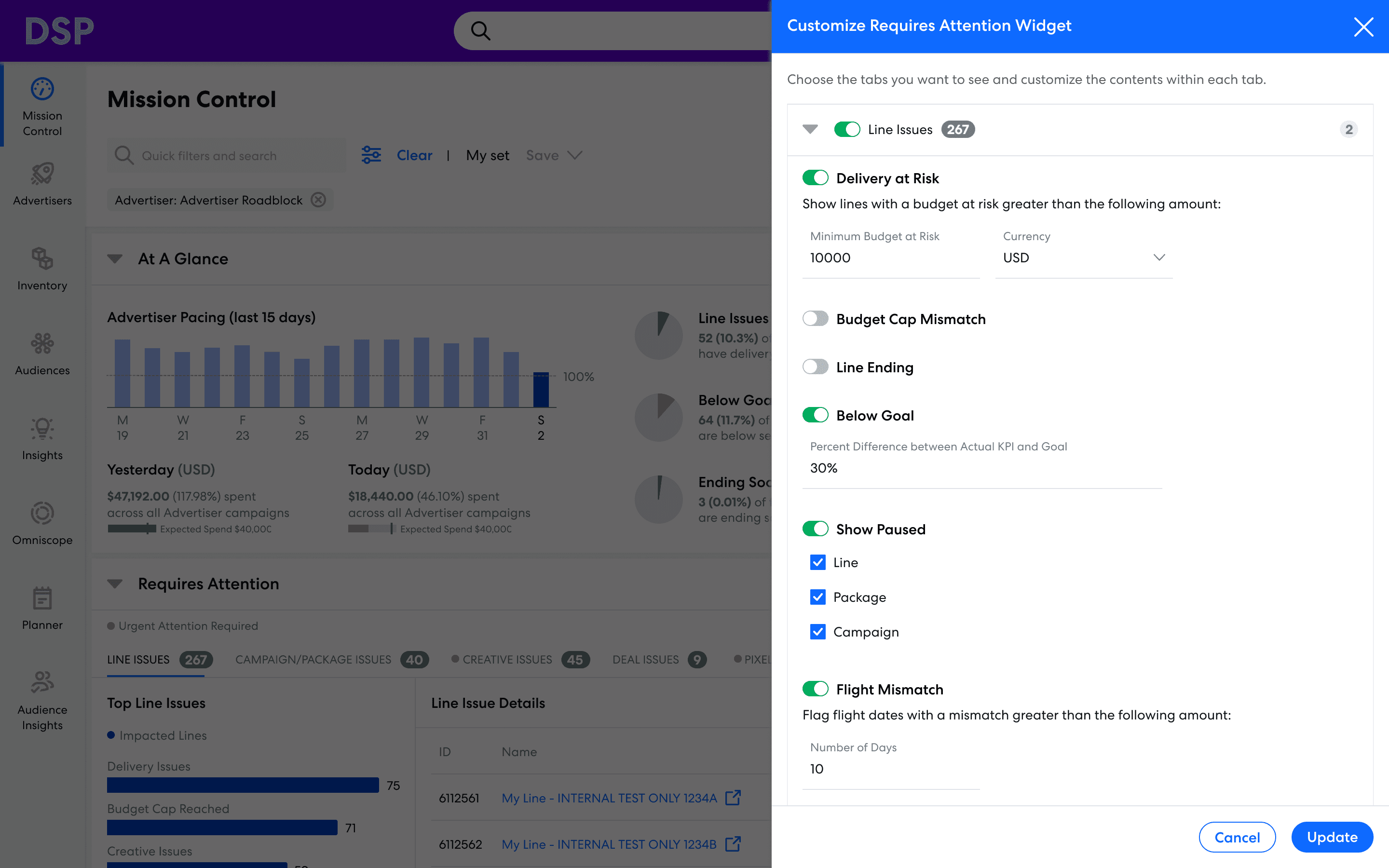
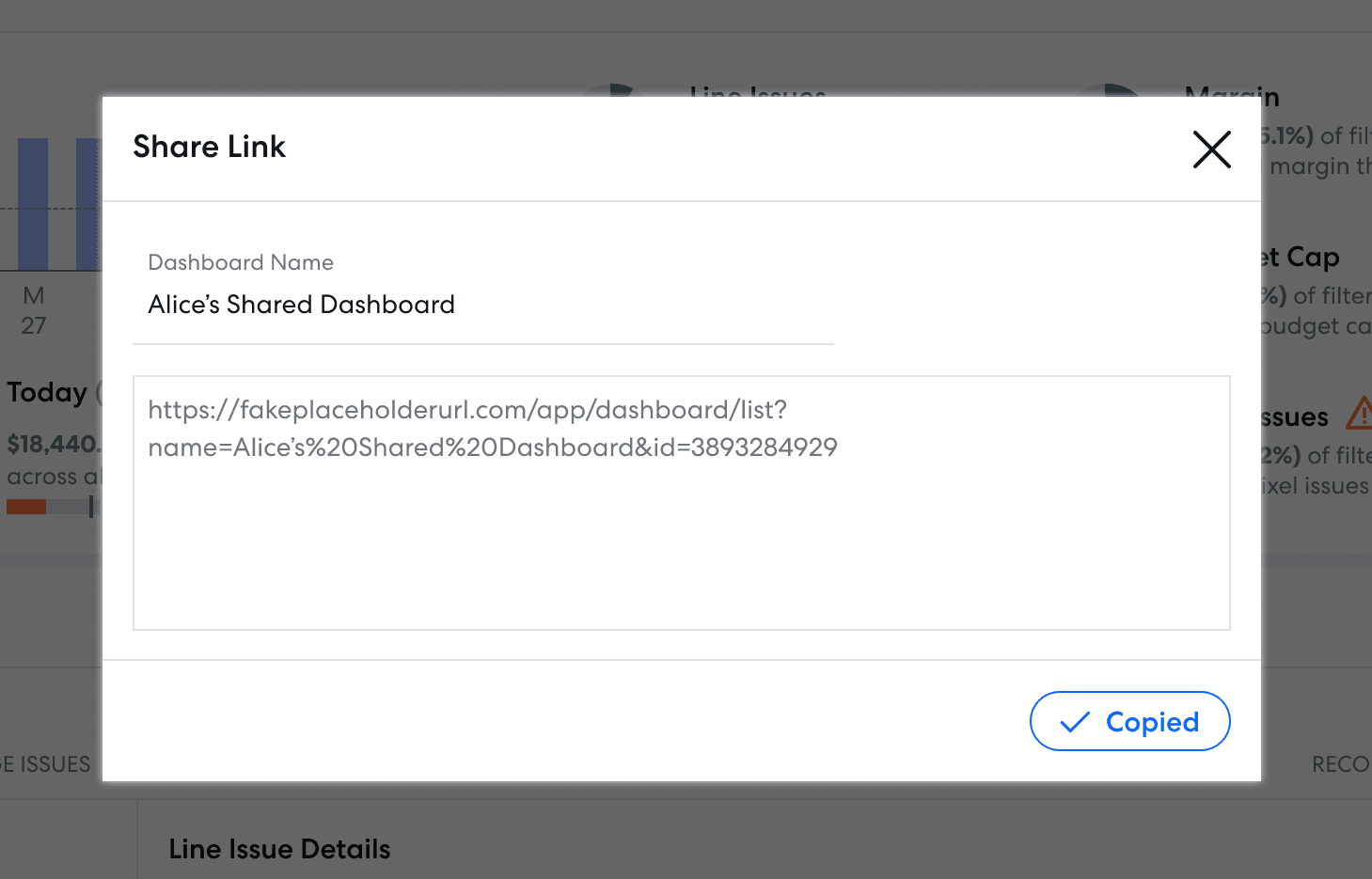
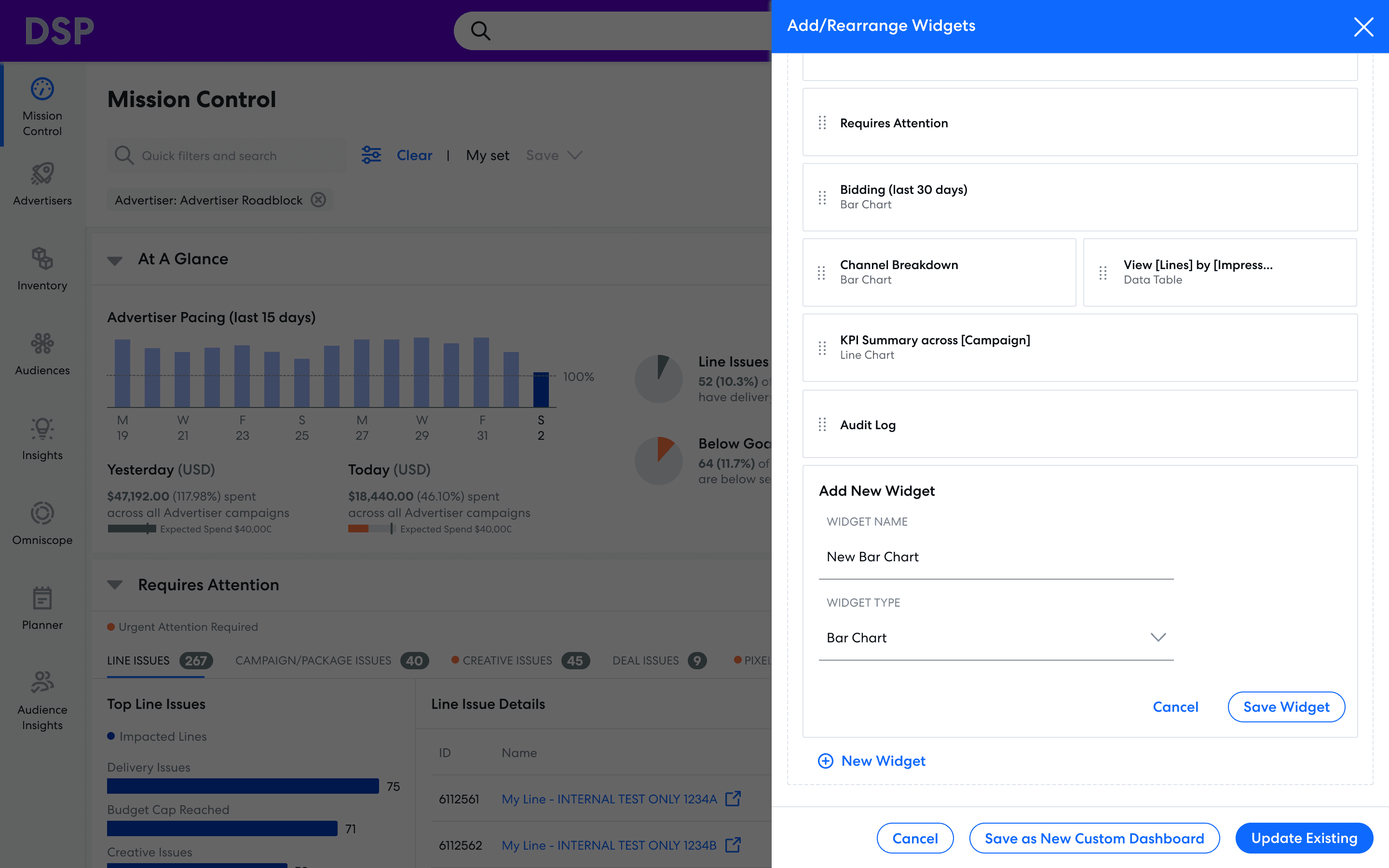
Feature Highlight: Threshold Customization
Every campaign manager has different criteria for what constitutes an issue. Each widget has fully customizable settings for which issues to show, and when.
Process Timeline
Initial Research
Interviewed the most active users of our platform to learn how they used the existing dashboard.
Cross-Team Brainstorm
Conducted brainstorm sessions with in-house campaign managers, product, engineering, research, and design.
Early Ideation
Sketches and low fidelity prototypes based off the results of the brainstorm.
Iterative Prototyping
Worked with UX Research team to create mocks, get feedback, improve mocks, get more feedback, improve further… until the final design.
Project Deprioritized
The project was deprioritized August 2021 and went on hiatus.
Project Reprioritized
In September 2023, I was suddenly informed that we were resourced to build this project after all, and by the way, are the designs still good?
Design Refresh
Updated designs to fit new style guide following a recent platform rebrand.
Validation
Reviewed mocks with users to make sure this design still met their needs.
The Finish Line!
After a long, hard road, the design above hit production in December 2023.
Process: Initial Exploration
Key Research Questions
Why isn't the current landing page working for our users?
What would be useful to them, instead?
Initial Research: From quantitative to qualitative
Analytics and surveys revealed friction points, highlighting where users struggled in existing flows.
User interviews explained the "why", uncovering motivations and pain behind the data.
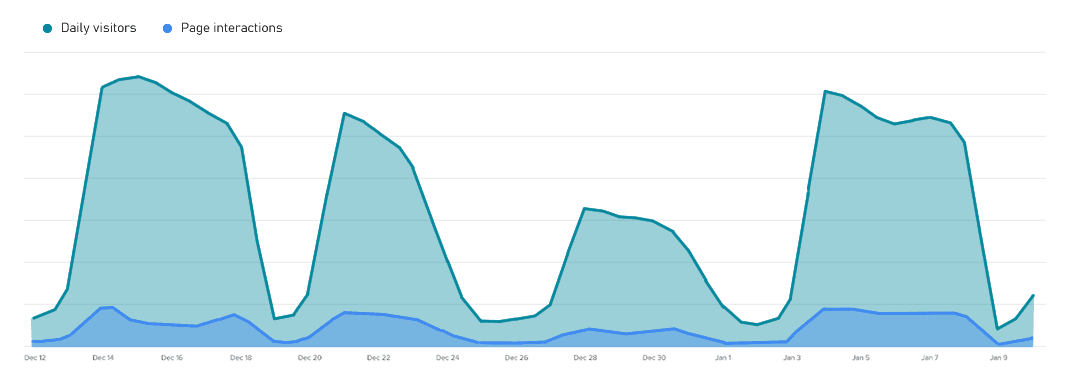
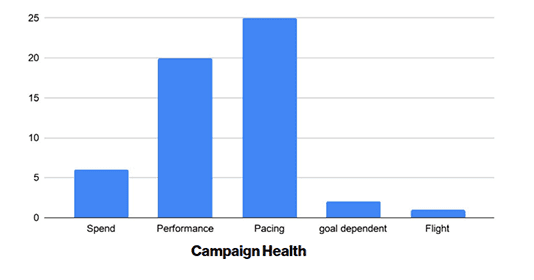
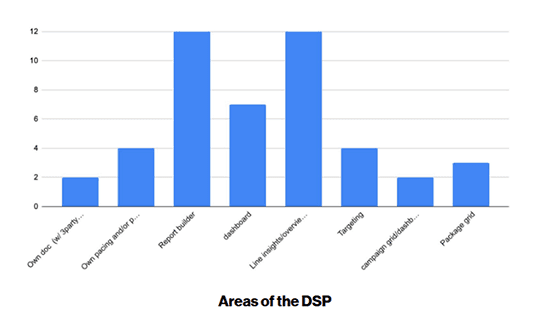
Left: Analytics highlighting the discrepency between page visits (high) and interactions within the page (low)
Right: Survey results revealing that Pacing is the most important metric, found via pulling reports
17
workflows tracked via Pendo
63
surveys on current behavior
9
in-depth user interviews
3
competitive analyses
Key Findings: Core tasks and KPIs poorly surfaced
Users prioritize account health and campaign optimization, making these the most critical tasks on the landing page.
One size doesn’t fit all, as workflows and KPI priorities vary across users.
Existing landing page fails users, surfacing no useful metrics and providing unclear next steps.
Pacing is the most important metric, yet users must navigate elsewhere to access it.
Competitor dashboards use card-based, customizable layouts, highlighting opportunities for a more user-centric design.
Process: Cross-functional Brainstorm
Giving Stakeholders a Voice
Led a cross-functional workshop using a system I developed org-wide, ensuring early alignment across teams.
Participants spanned product and user teams, ensuring diverse perspectives are represented for this high-visibility initiative.
Workshop Agenda: research presentation, idea generation, and concept alignment.
19
TOTAL PARTICIPANTS
3
Product Managers
4
Designers
1
Researcher
5
Engineers
6
Account Managers
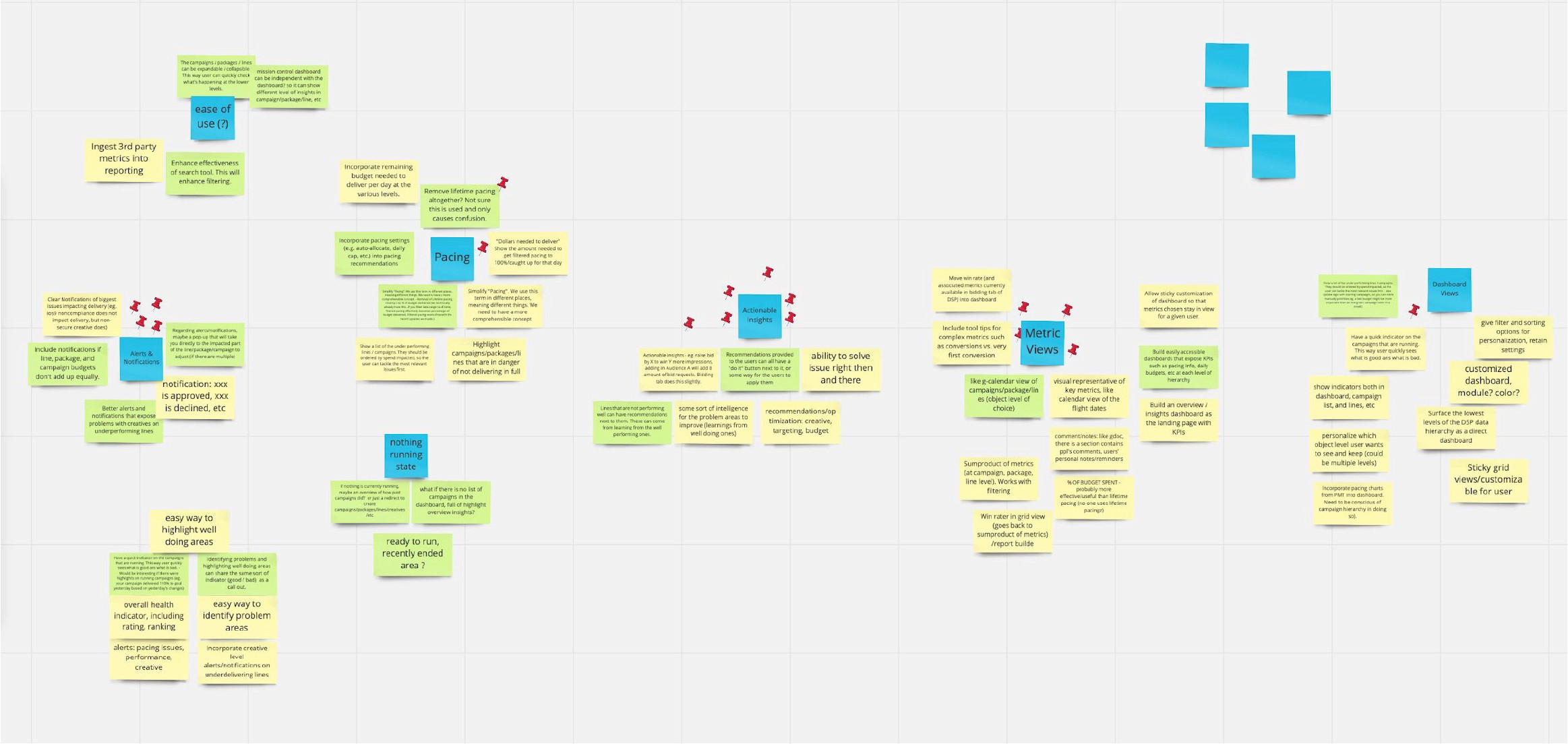
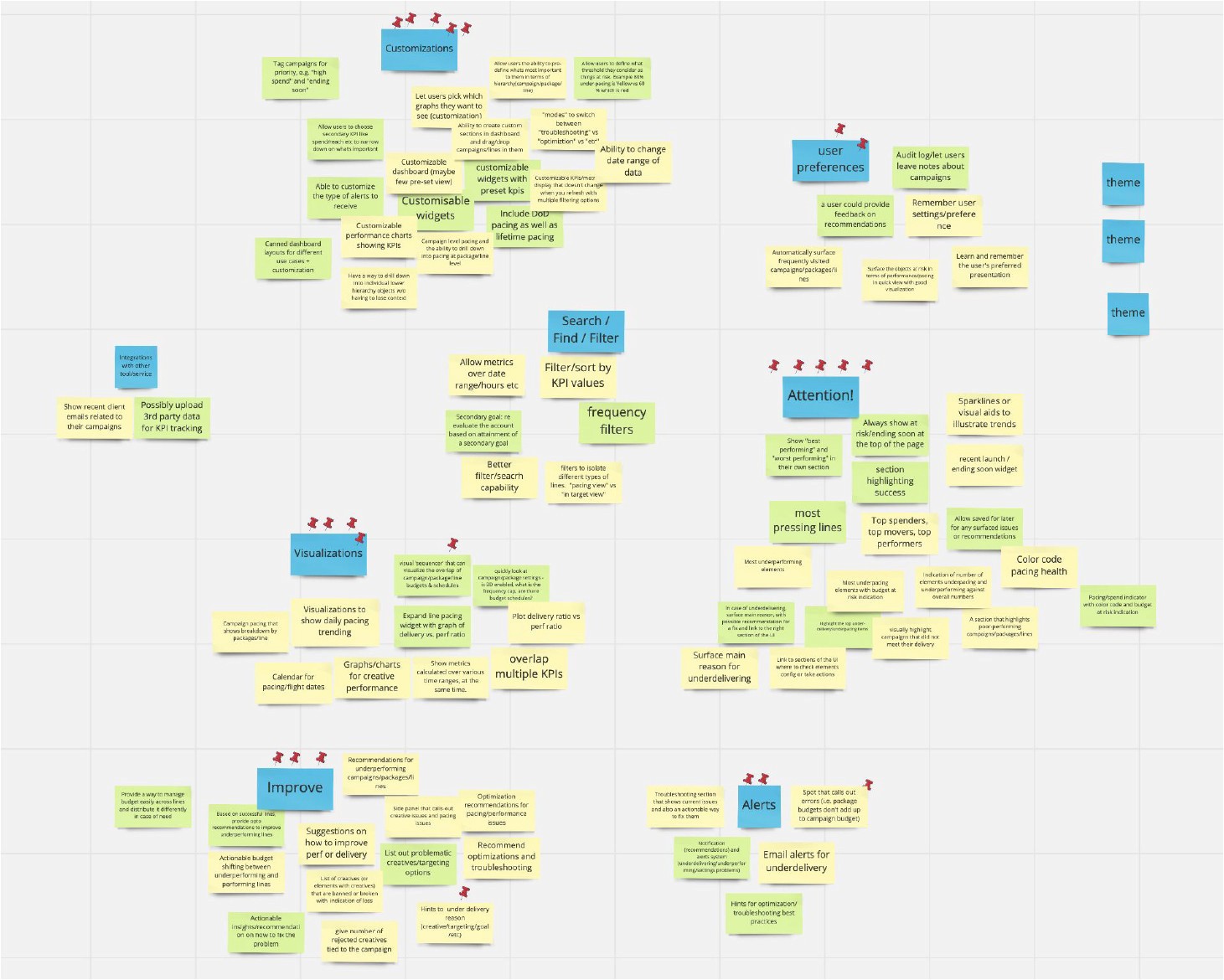
Sketch Phase
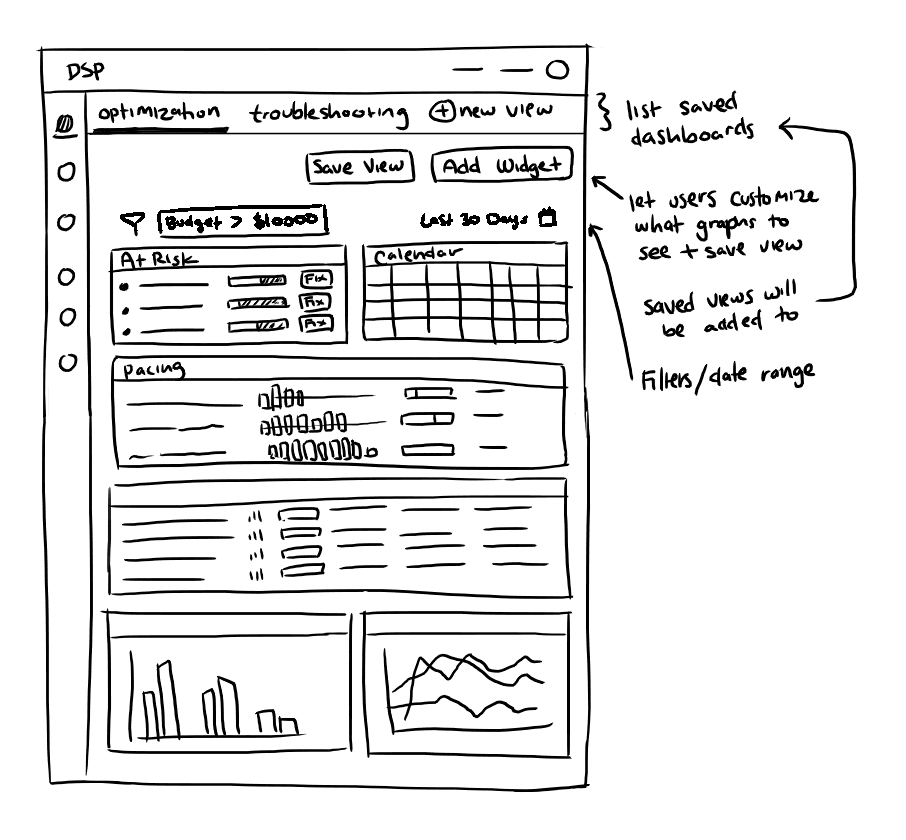
I translated workshop concepts into sketches, forming the foundation for the concept pitch.
Overall Dashboard Layout
Problem: The existing dashboard is dead space and lacks useful information.
Solution: Interactive card-based view that presents data in an easily-digestible way.
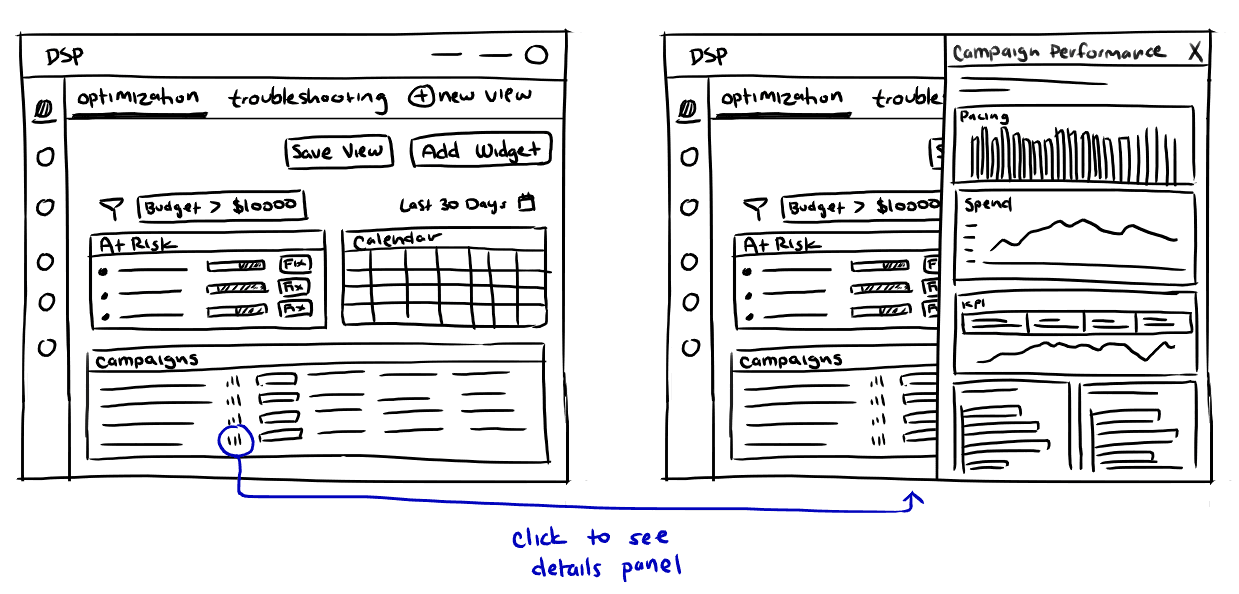
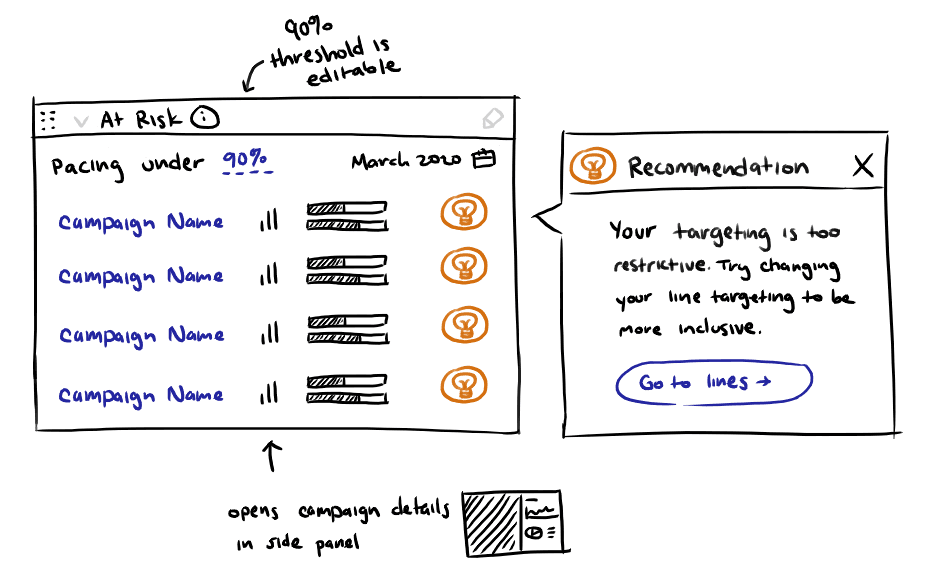
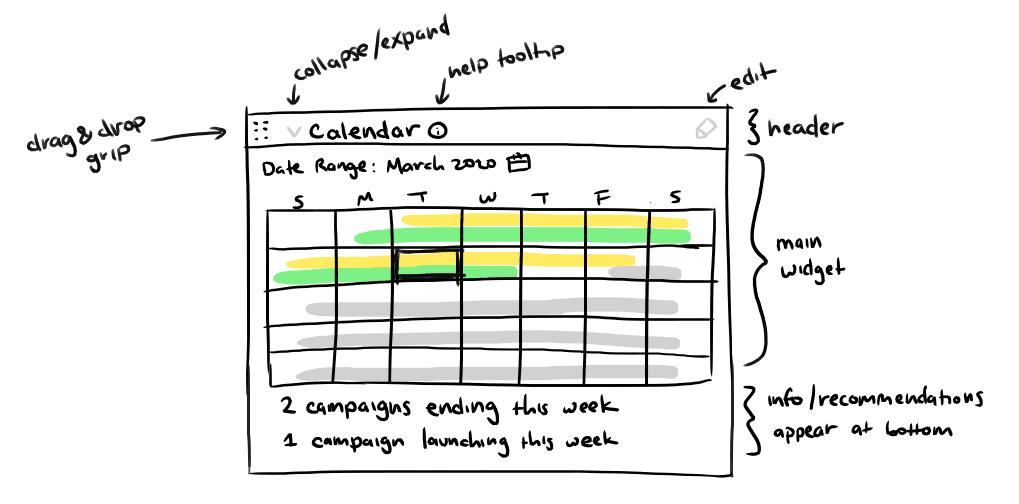
Widgets
Problem: Users are unclear on next steps even after pulling data.
Solution: Widgets tailored to specific use cases with recommendations and clear next steps.
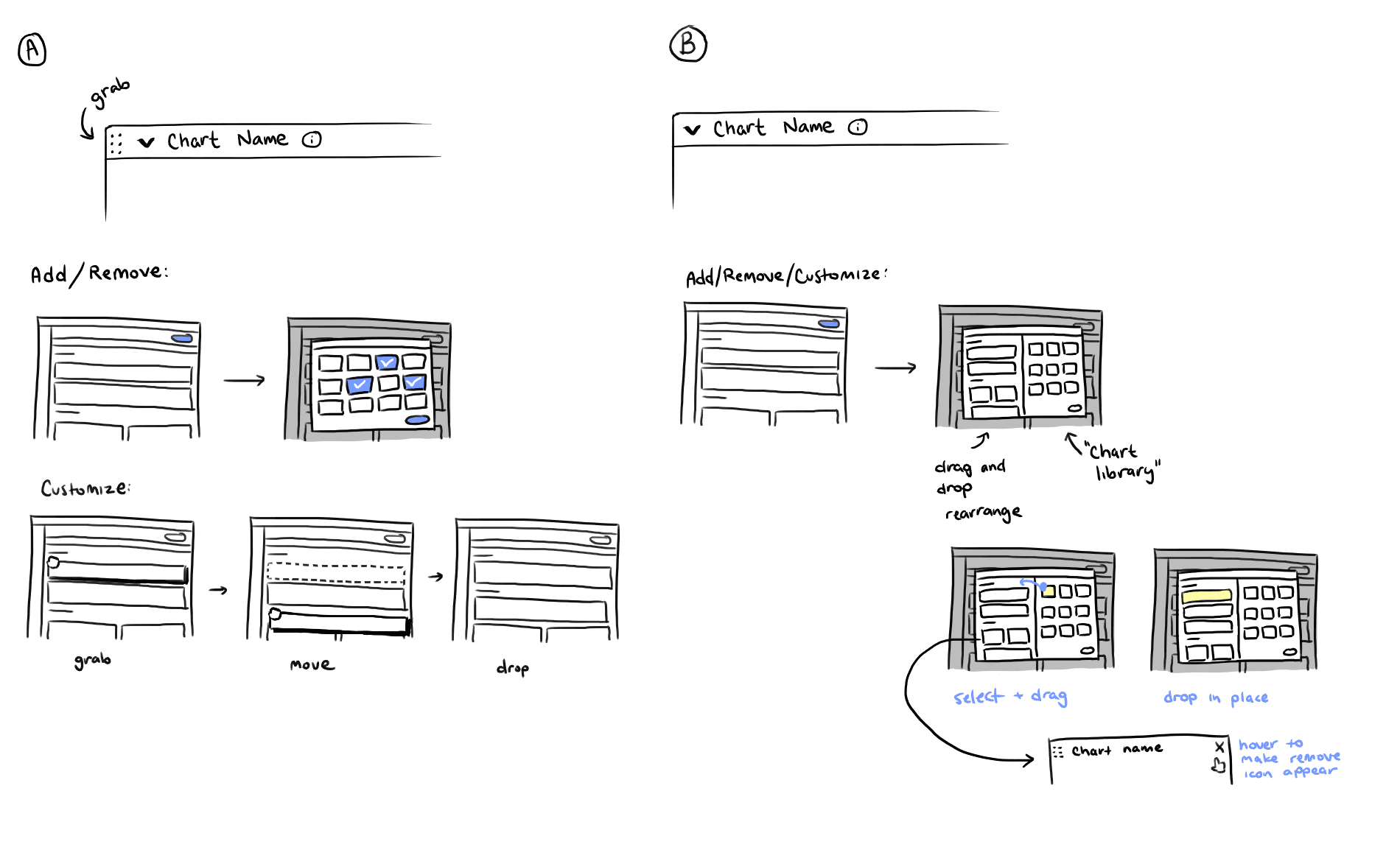
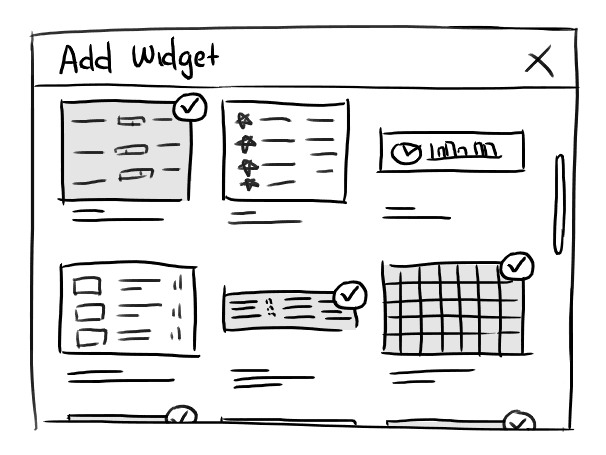
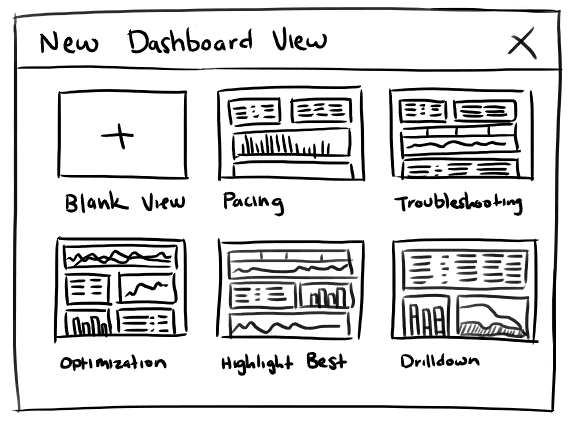
Customization
Problem: Users have wildly different workflows and care about different metrics depending on their campaign properties.
Solution: Allow users to customize their dashboards for different use cases.
Process: Design Iterations
Summary of Design Direction
Starting Assumption: Users value customization and want to build dashboards from the ground up.
Low-fidelity Mocks: Validated layout and customization concepts.
Pivot: Discovered users preferred useful defaults over building from scratch, shifting design focus.
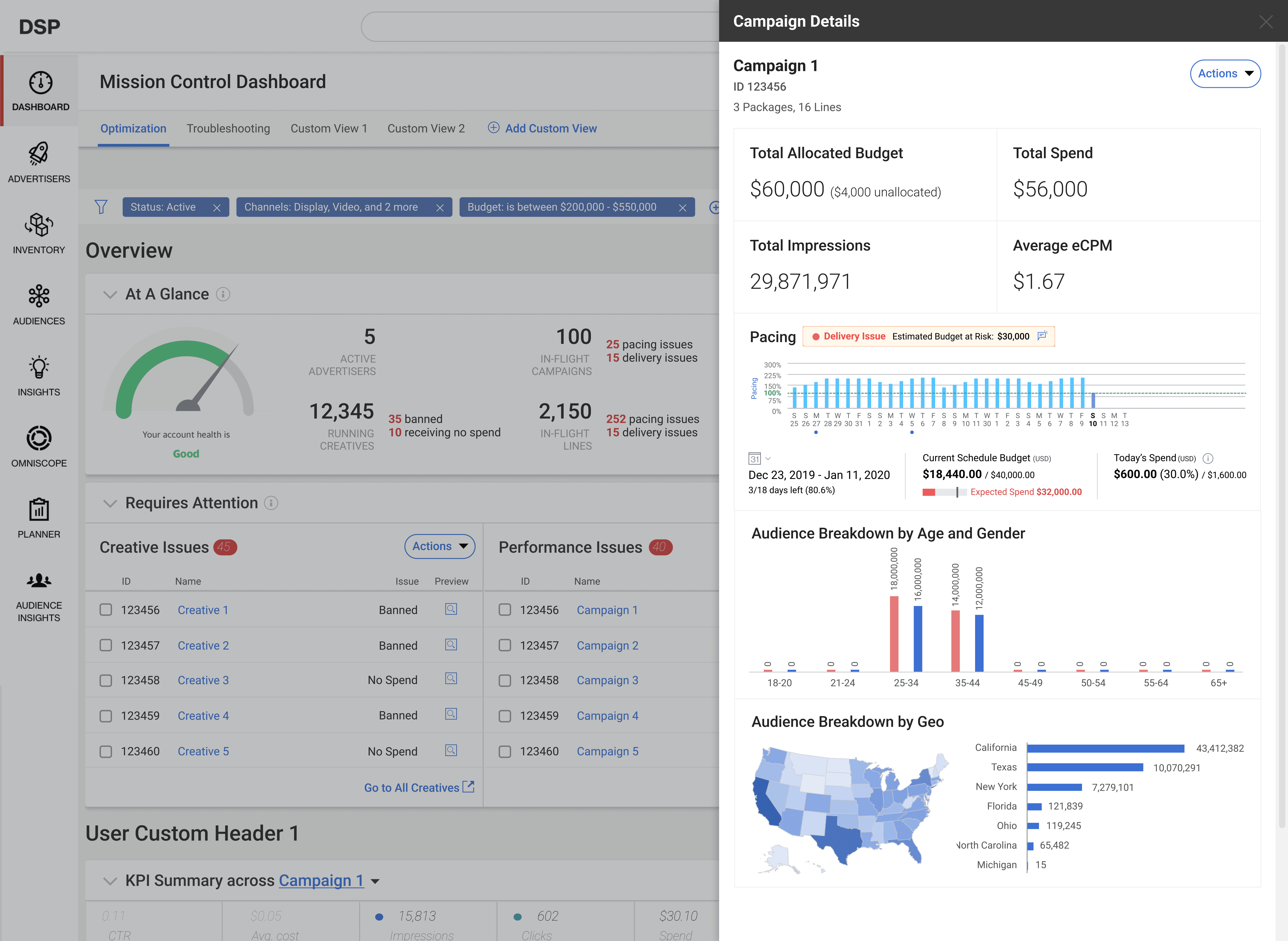
Mid-fidelity Mocks: Refined default widgets to surface actionable metrics and meet core needs.
Interactive Prototype: Reintroduced customization to refine, not define, the experience.
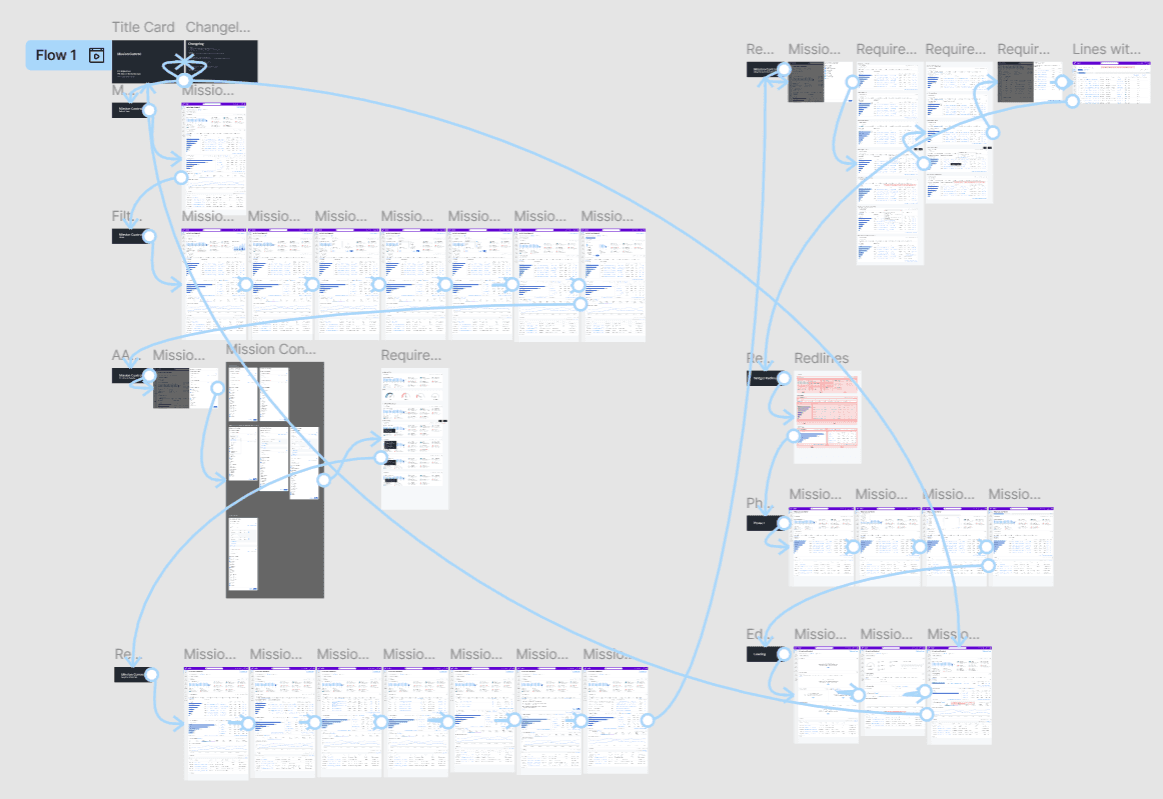
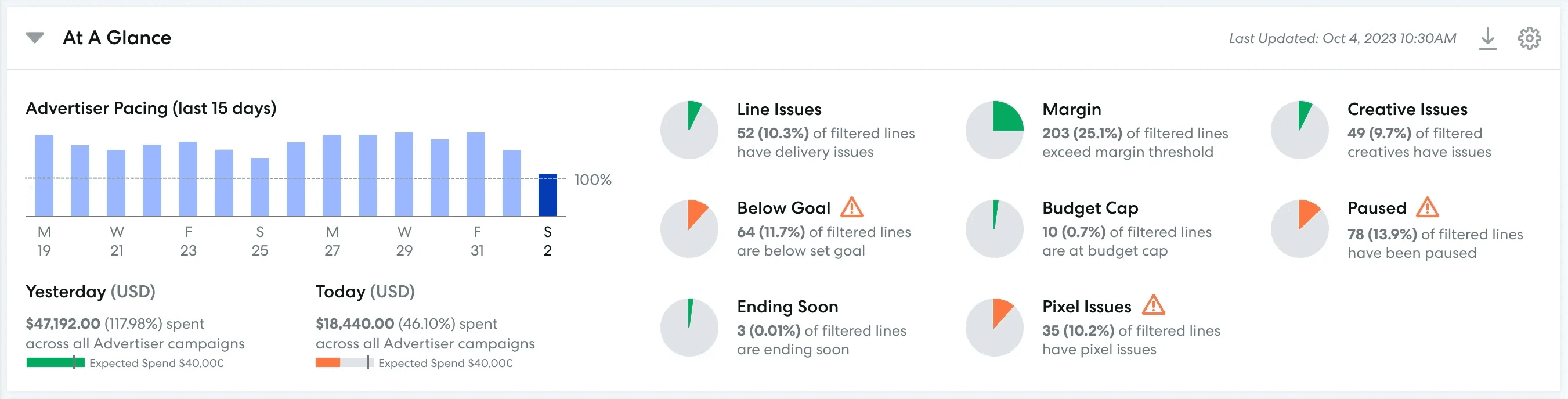
Example Design Evolution: At a Glance Widget
Use Case
Users should be able to tell immediately whether or not their account has issues that require their attention.
What Didn't Work (Iteration 1)
Design Goals: Highlight account health severity, call out issues in red, surface important KPIs and time-sensitive campaigns
Observations: Severity unclear; scannability issues with small labels and numbers; missing pacing info, which is the most important metric for users
Intent: Health meter to show severity of account health, issues called out in red, important KPIs and time-sensitive campaigns visible
Severity unclear—the design failed to communicate whether metrics were within healthy thresholds
Scannability issues—labels too small, numbers are meaningless at a glance
Lack of pacing information is a dealbreaker as it is the most important metric for most users

What Didn't Work (Iteration 2)
Design Goals: Larger labels, stoplight-colored pie charts for severity (clickable for details), pacing included
Observations: Health meter consumes space without actionable insight; issues not immediately clear; pacing needs more prominence; accessibility concerns with stoplight colors

Final Version
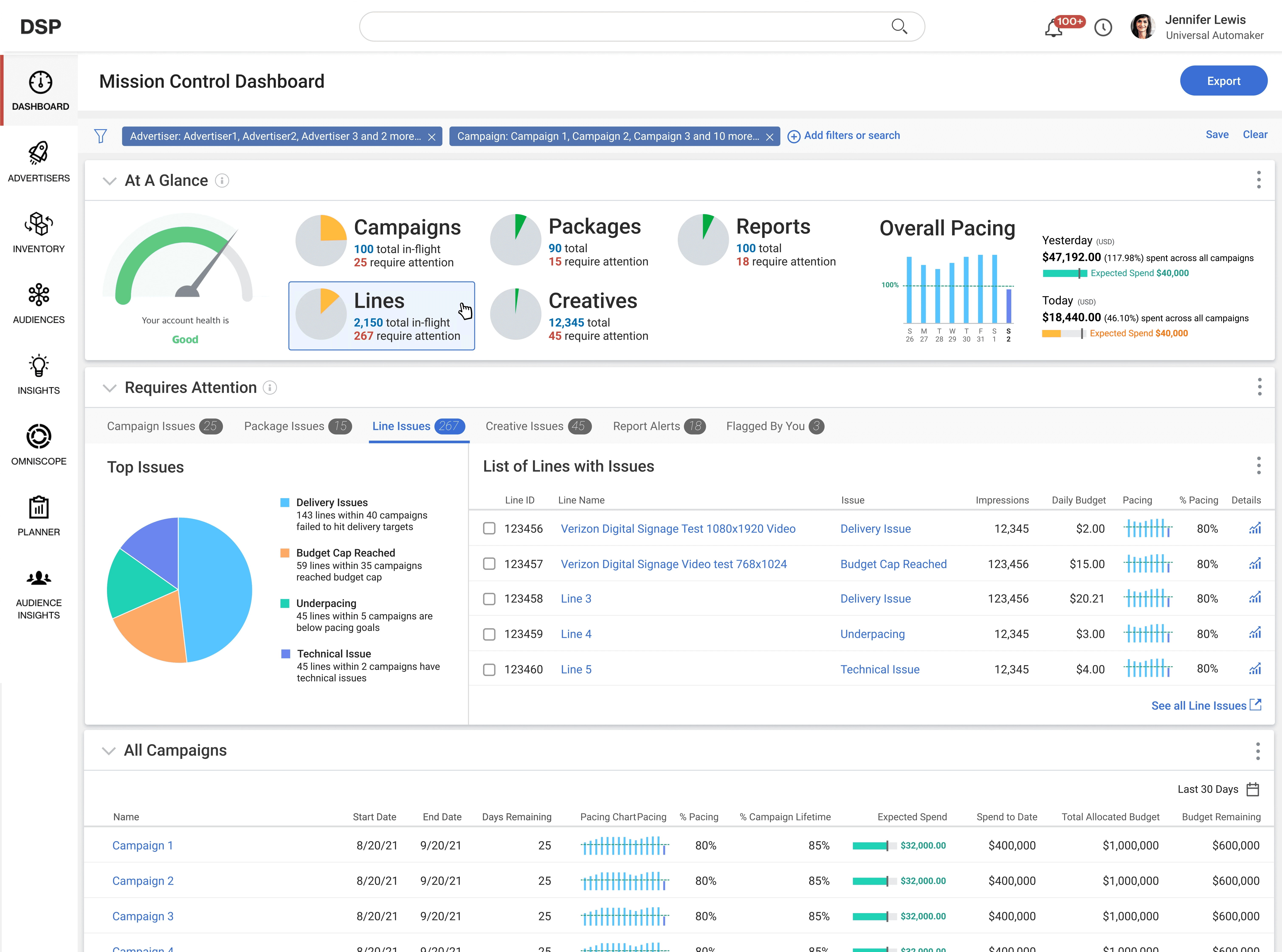
Pacing is now the first thing the eye encounters when scanning the page (positioned in the top left by default)
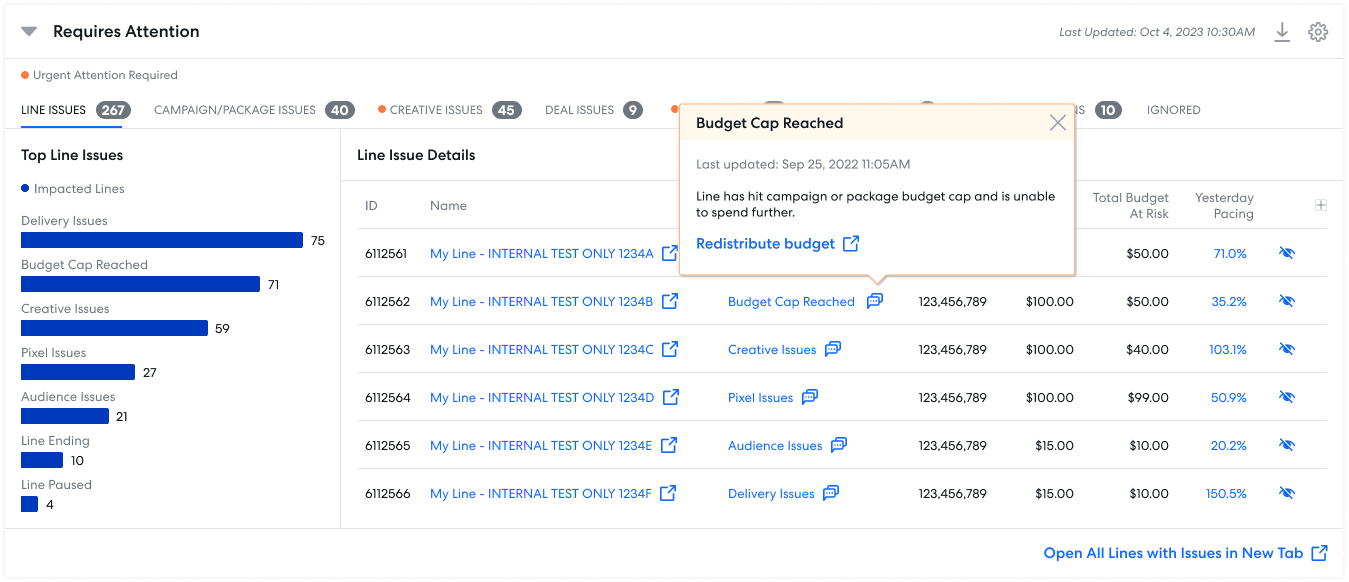
Issues are a first-class item: Pie charts now represent issue types and can be customized to only display issues a user cares about
Accessibility improvements: Alert icon and contrast improvements reduce reliance on color alone
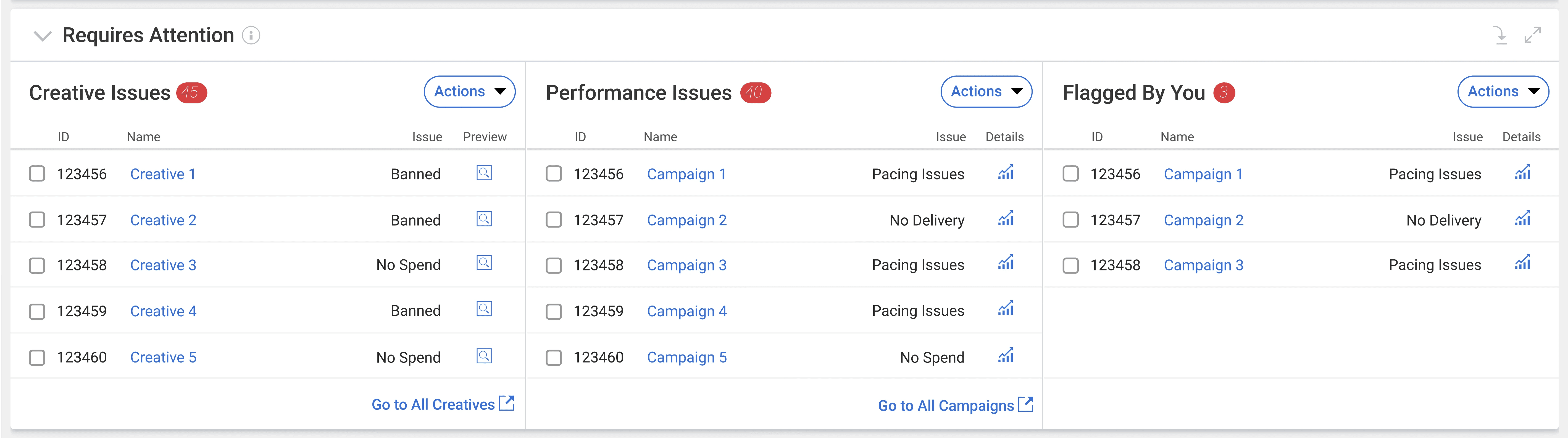
Example Design Principle: Actionability
Defining Actionability
Problem: Overloaded widgets tried to do too much, effectively recreating full workflows and confusing users.
Solution: Prioritize essential interactions—customization, filtering, and viewing details—while linking out to full workflows for resolution.
Design Principle: Treat the landing page as a hub—surface the issue, clarify it, and link to the workflow to resolve it.
What Didn't Work (Iterations 1 and 2)
Design Goals: Surface account issues and provide tools to fix them
Observations: Early iterations felt busy and lacked clear hierarchy; users confused by too many options
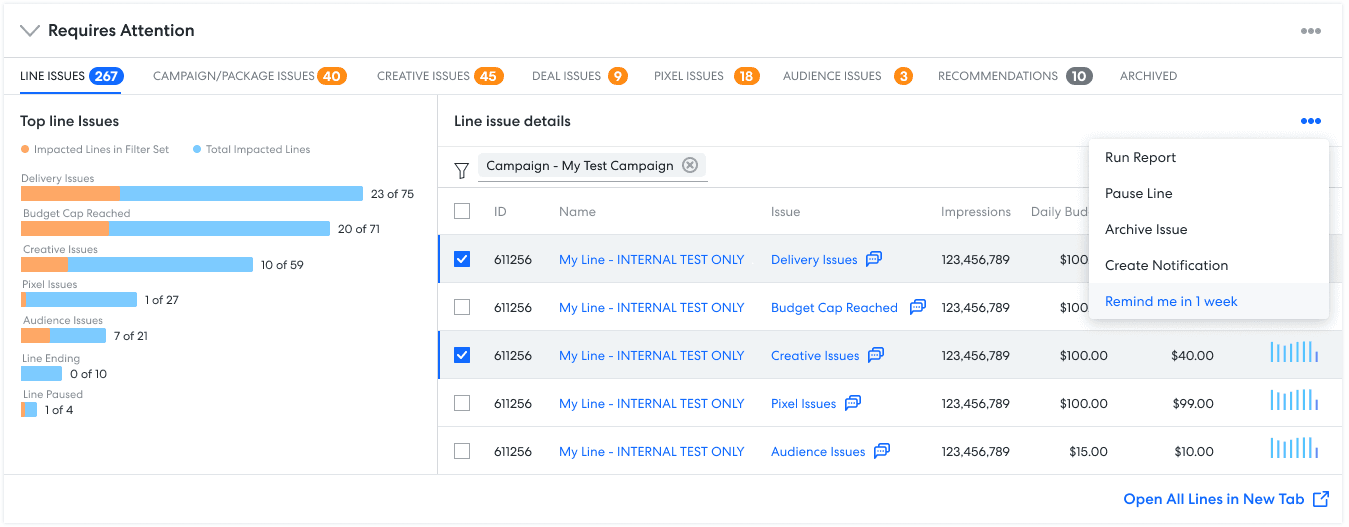
Final Version
Tabbed view: Each list lives in its own tab so users can focus on one area at a time
Issues Detail column gives a single clear recommended course of action for each issue
Extraneous actions stripped away
Example Pivot: Calendar and Audit Log
Designing the Right Widgets
Each widget was intended to solve a core user need; some were discarded or replaced when they didn’t meet that need, as illustrated below.
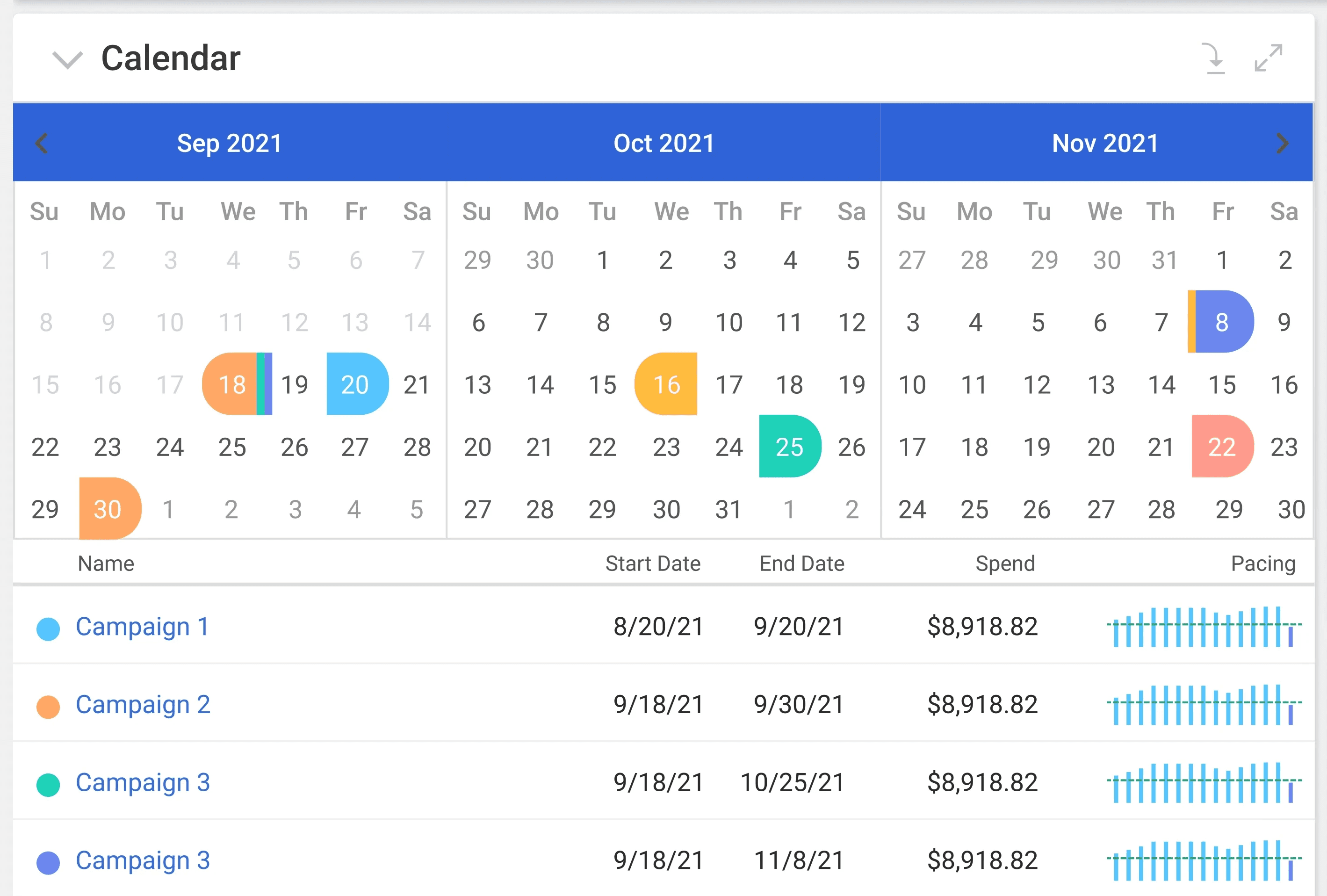
What Didn't Work (Calendar)
Design Goal: Highlight campaign start and end dates and allow users to drill down to see actions on specific dates
Observations: Interface felt too busy; mental model mismatch (users conceptualize campaigns by budget completion, not by dates)
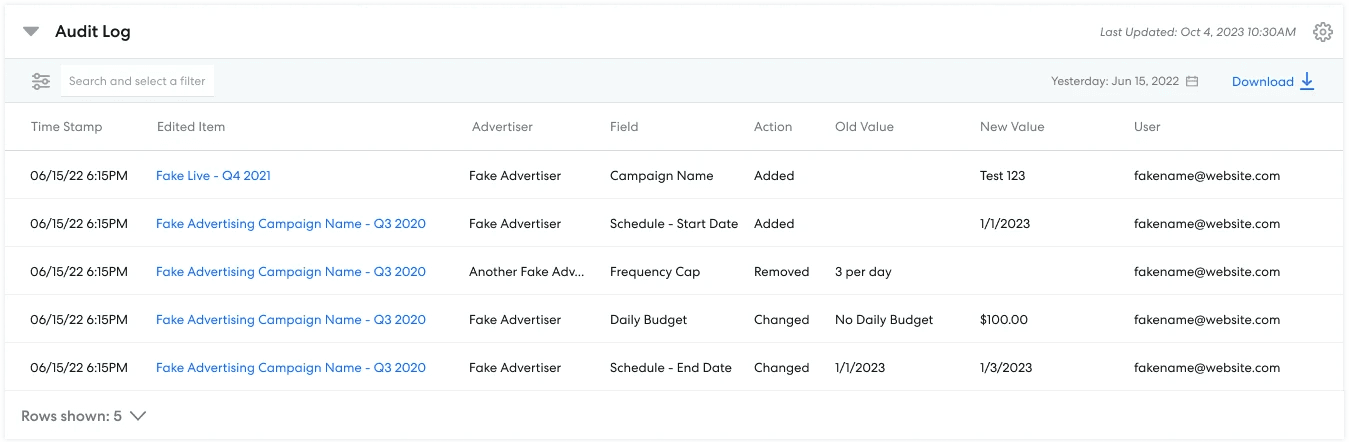
Final Version (Audit Log)
Familiarity—this is a component that exists elsewhere in the platform; users already refer to it frequently for troubleshooting
Meets user needs—unlike the calendar, the focus is not on how dates are arranged but on the actions taken on each date
Impact
Workflow Impact: Before
Flows required extra steps to navigate to other parts of the platform and manually pull reports
None of the daily core workflows originated on the landing page
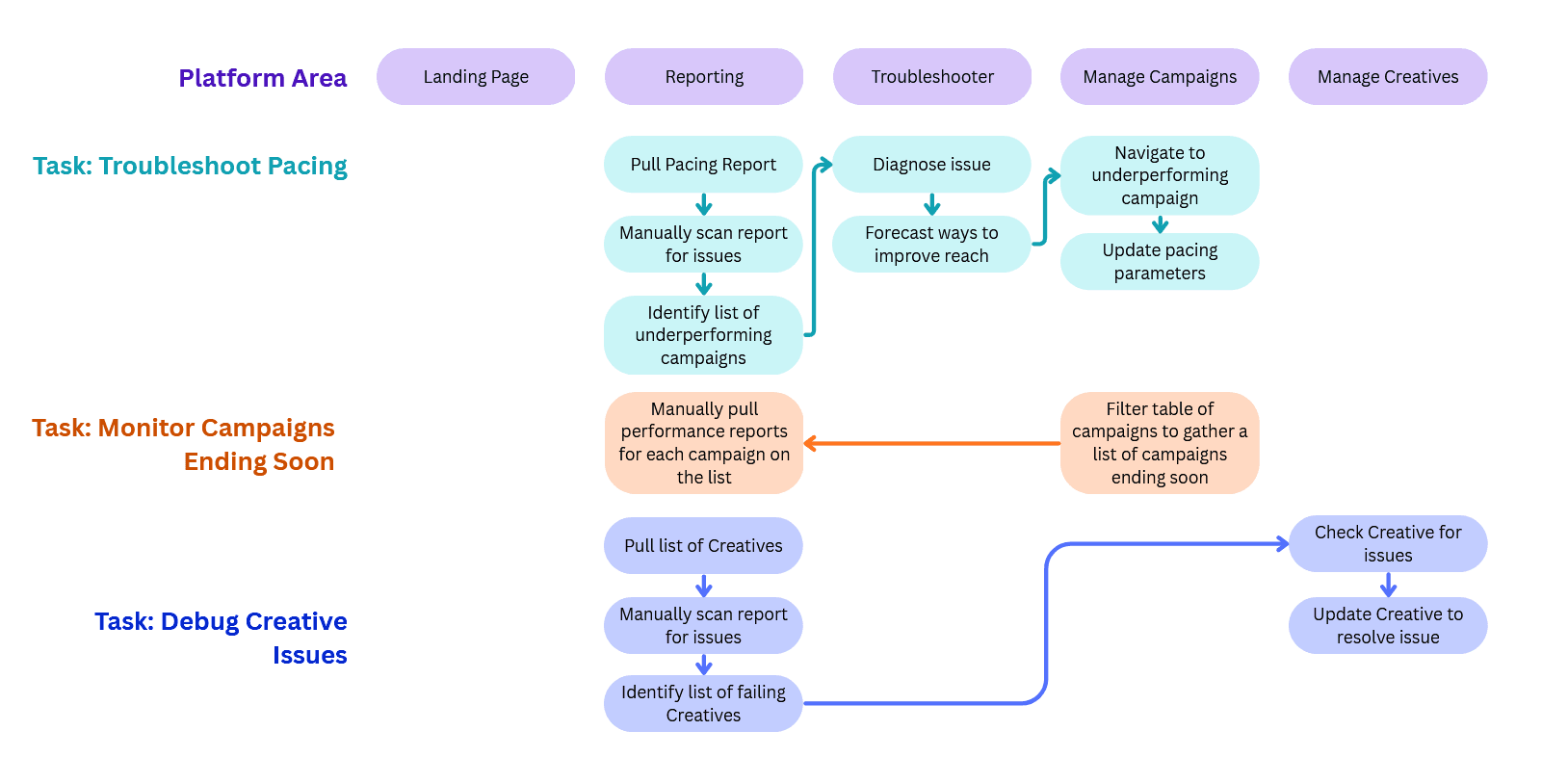
Workflow Impact: After
Widgets surface insights and assist navigation, reducing core daily tasks to 1-3 clicks.
All daily core workflows originate on the landing page
Quantifiable Results
85%
of users remain on the Mission Control page when managing their campaigns, compared to 15% previously.
94%
of Mission Control users make use of the Requires Attention widget to view Line Issues
In a follow-up satisfaction survey, users rated Mission Control on average:
83/100
for ease of use
81/100
for speed and responsiveness
78/100
for total user satisfaction
7/7
for Overall Utility
“Definitely the best dashboard of the big four that I've used. I would definitely use it every day. Everything is visually in front of you and you can make quick decisions without having to pull a report.”
“You guys kinda killed this. The dashboard looks fun. I'm such a visual person so I love stuff like this.”
“Oooh I love this. This looks really good compared to what I'm used to. Everything is right there. Anything the system can do that can help troubleshoot and gather as much information as possible in one spot helps us to be more successful.”
What's Next?
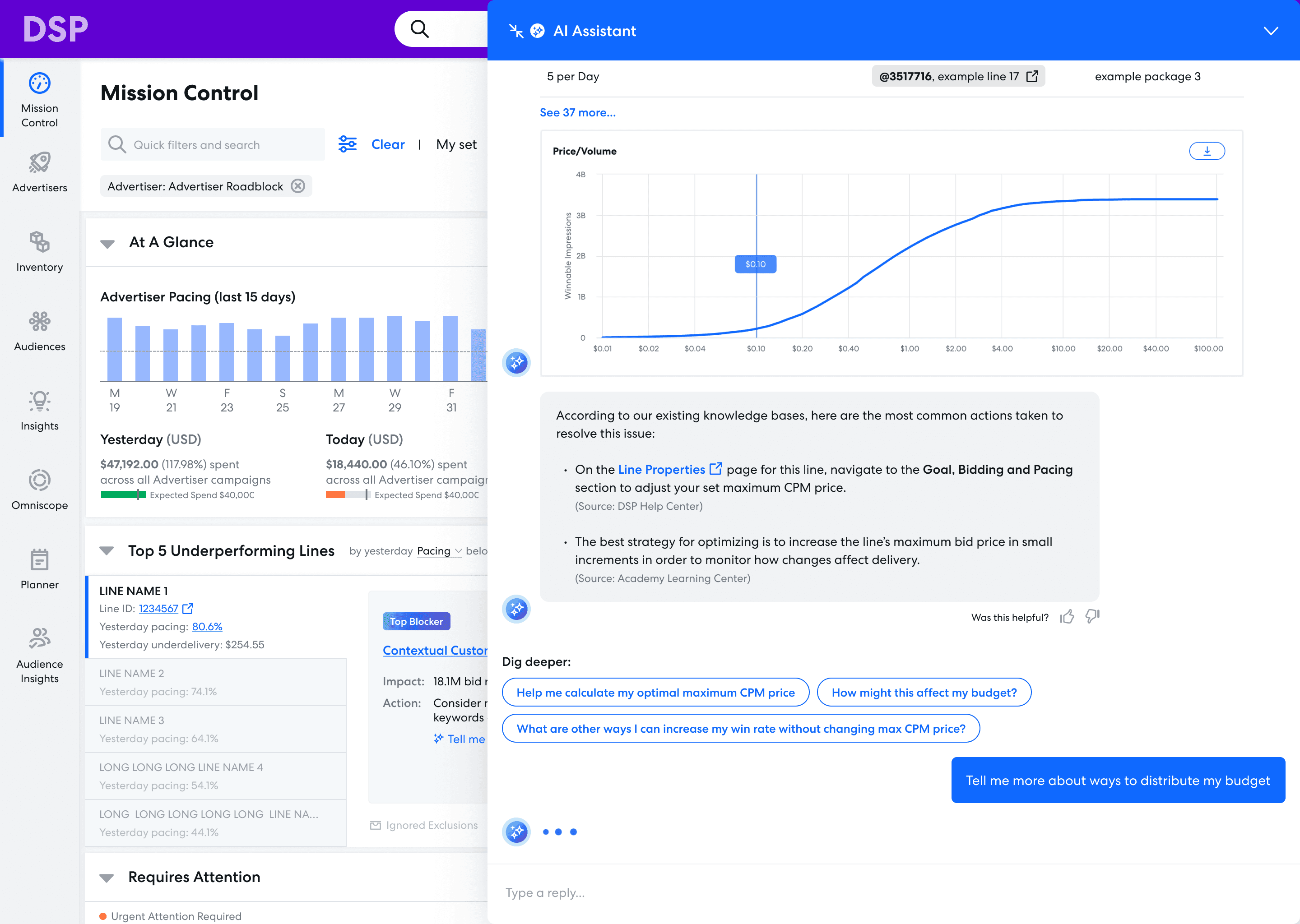
The "Top 5 Underperforming Lines" widget was created by a fellow designer and is not my work. The AI Assistant panel, however, is mine.
Mission Control was designed to be scalable. Adding more features to it is a simple matter of creating new widgets.
Before my time with this company came to a close, I was working on an AI assistant that integrated with Mission Control.
You can see a preview of it to the left, and learn more about the process behind it in my AI Workflow Assistant case study!
Go to AI Workflow Assistant Case Study
Enter password from resume to view project
© 2026 Eugenia Lee
Mission Control
From low adoption to the first click of every workday
An interactive, highly customizable landing page that gives ad campaign managers a real-time view of all active campaigns in one place. Built with drag-and-drop sections, it became the central hub for monitoring performance and launching daily workflows.
Case Study Overview
Impact: A new hub for daily workflows
100% of core daily workflows now originate from the new landing page, up from 0%, establishing it as the primary entry point for daily use
4.6x increase in engagement, with 85% of users interacting with landing page content daily (versus 15% previously)
40-60% fewer steps for common workflows, reducing repetitive daily tasks from 5-7 clicks to 1-3.
Old (Pre-existing Design)
New (My Redesign)
My Role
Owned end-to-end design, from research synthesis to final mocks and interaction flows. Mentored a junior designer through early ideation (2020–2021)
Timeline
Design: May 2020 – Aug 2021
(Paused for two years)
Development: Sep 2023 – Dec 2023
Team Size (2020)
2 Designers
1 Product Manager
1 UX Researcher
Team Size (2023)
1 Designer
1 Product Manager
1 UX Researcher
1 Tech Writer
~30 Engineers
The Challenge
Business Problem: High friction and poor first impressions drive user churn
User experience is a retention driver, according to customer surveys.
A high-friction entry point impacts all core workflows, slowing down daily use.
The landing page is the highest-impact surface, shaping expectations for the whole platform.
User Problem: Landing page doesn't support core workflows
Core tasks are buried in navigation, causing users to bypass the landing page.
Critical data is locked in reports, not surfaced where it’s needed.
A new landing page could streamline daily flows, reducing steps and improving efficiency.
The old landing page (not my work)
Example User Journey Map that illustrates a few core workflows
My Solution
Mission Control: A launchpad that keeps users informed and gets them where they need to go
Shows all the information a campaign manager needs upfront with easy-to-read visuals.
Is fully modular and customizable, with the ability to save and share dashboard views.
Provides upfront access to all core platform workflows and guides them towards task completion.
Solving the Workflow Problem
Positions the landing page as the primary entry point for daily use.
Surfaces key metrics upfront, eliminating the need to pull reports to complete core workflows.
See more in the Impact section at the end of the case study.
Feature Highlight: Threshold Customization
Every campaign manager has different criteria for what constitutes an issue. Each widget has fully customizable settings for which issues to show, and when.
Feature Highlight: Threshold Customization
Every campaign manager has different criteria for what constitutes an issue. Each widget has fully customizable settings for which issues to show, and when.
Process Timeline
Initial Research
Interviewed the most active users of our platform to learn how they used the existing dashboard.
Cross-Team Brainstorm
Conducted brainstorm sessions with in-house campaign managers, product, engineering, research, and design.
Early Ideation
Sketches and low fidelity prototypes based off the results of the brainstorm.
Iterative Prototyping
Worked with UX Research team to create mocks, get feedback, improve mocks, get more feedback, improve further… until the final design.
Project Deprioritized
The project was deprioritized August 2021 and went on hiatus.
Project Reprioritized
In September 2023, I was suddenly informed that we were resourced to build this project after all, and by the way, are the designs still good?
Design Refresh
Updated designs to fit new style guide following a recent platform rebrand.
Validation
Reviewed mocks with users to make sure this design still met their needs.
The Finish Line!
After a long, hard road, the design above hit production in December 2023.
Process: Initial Exploration
Key Research Questions
Why isn't the current landing page working for our users?
What would be useful to them, instead?
Initial Research: From quantitative to qualitative
Analytics and surveys revealed friction points, highlighting where users struggled in existing flows.
User interviews explained the "why", uncovering motivations and pain behind the data.
Left: Analytics highlighting the discrepency between page visits (high) and interactions within the page (low)
Right: Survey results revealing that Pacing is the most important metric, found via pulling reports
17
workflows tracked via Pendo
63
surveys on current behavior
9
in-depth user interviews
3
competitive analyses
Key Findings: Core tasks and KPIs poorly surfaced
Users prioritize account health and campaign optimization, making these the most critical tasks on the landing page.
One size doesn’t fit all, as workflows and KPI priorities vary across users.
Existing landing page fails users, surfacing no useful metrics and providing unclear next steps.
Pacing is the most important metric, yet users must navigate elsewhere to access it.
Competitor dashboards use card-based, customizable layouts, highlighting opportunities for a more user-centric design.
Process: Cross-functional Brainstorm
Giving Stakeholders a Voice
Led a cross-functional workshop using a system I developed org-wide, ensuring early alignment across teams.
Participants spanned product and user teams, ensuring diverse perspectives are represented for this high-visibility initiative.
Workshop Agenda: research presentation, idea generation, and concept alignment.
19
TOTAL PARTICIPANTS
3
Product Managers
4
Designers
1
Researcher
5
Engineers
6
Account Managers
Sketch Phase
I translated workshop concepts into sketches, forming the foundation for the concept pitch.
Overall Dashboard Layout
Problem: The existing dashboard is dead space and lacks useful information.
Solution: Interactive card-based view that presents data in an easily-digestible way.
Widgets
Problem: Users are unclear on next steps even after pulling data.
Solution: Widgets tailored to specific use cases with recommendations and clear next steps.
Customization
Problem: Users have wildly different workflows and care about different metrics depending on their campaign properties.
Solution: Allow users to customize their dashboards for different use cases.
Process: Design Iterations
Summary of Design Direction
Starting Assumption: Users value customization and want to build dashboards from the ground up.
Low-fidelity Mocks: Validated layout and customization concepts.
Pivot: Discovered users preferred useful defaults over building from scratch, shifting design focus.
Mid-fidelity Mocks: Refined default widgets to surface actionable metrics and meet core needs.
Interactive Prototype: Reintroduced customization to refine, not define, the experience.
Example Design Evolution: At a Glance Widget
Use Case
Users should be able to tell immediately whether or not their account has issues that require their attention.
What Didn't Work (Iteration 1)
Design Goals: Highlight account health severity, call out issues in red, surface important KPIs and time-sensitive campaigns
Observations: Severity unclear; scannability issues with small labels and numbers; missing pacing info, which is the most important metric for users
What Didn't Work (Iteration 2)
Design Goals: Larger labels, stoplight-colored pie charts for severity (clickable for details), pacing included
Observations: Health meter consumes space without actionable insight; issues not immediately clear; pacing needs more prominence; accessibility concerns with stoplight colors
Final Version
Pacing is now the first thing the eye encounters when scanning the page (positioned in the top left by default)
Issues are a first-class item: Pie charts now represent issue types and can be customized to only display issues a user cares about
Accessibility improvements: Alert icon and contrast improvements reduce reliance on color alone
Example Design Principle: Actionability
Defining Actionability
Problem: Overloaded widgets tried to do too much, effectively recreating full workflows and confusing users.
Solution: Prioritize essential interactions—customization, filtering, and viewing details—while linking out to full workflows for resolution.
Design Principle: Treat the landing page as a hub—surface the issue, clarify it, and link to the workflow to resolve it.
What Didn't Work (Iterations 1 and 2)
Design Goals: Surface account issues and provide tools to fix them
Observations: Early iterations felt busy and lacked clear hierarchy; users confused by too many options
Final Version
Tabbed view: Each list lives in its own tab so users can focus on one area at a time
Issues Detail column gives a single clear recommended course of action for each issue
Extraneous actions stripped away
Example Pivot: Calendar and Audit Log
Designing the Right Widgets
Each widget was intended to solve a core user need; some were discarded or replaced when they didn’t meet that need, as illustrated below.
What Didn't Work (Calendar)
Design Goal: Highlight campaign start and end dates and allow users to drill down to see actions on specific dates
Observations: Interface felt too busy; mental model mismatch (users conceptualize campaigns by budget completion, not by dates)
Final Version (Audit Log)
Familiarity—this is a component that exists elsewhere in the platform; users already refer to it frequently for troubleshooting
Meets user needs—unlike the calendar, the focus is not on how dates are arranged but on the actions taken on each date
Impact
Workflow Impact: Before
Flows required extra steps to navigate to other parts of the platform and manually pull reports
None of the daily core workflows originated on the landing page
Workflow Impact: After
Widgets surface insights and assist navigation, reducing core daily tasks to 1-3 clicks.
All daily core workflows originate on the landing page
Quantifiable Results
85%
of users remain on the Mission Control page when managing their campaigns, compared to 15% previously.
94%
of Mission Control users make use of the Requires Attention widget to view Line Issues
In a follow-up satisfaction survey, users rated Mission Control on average:
83/100
for ease of use
81/100
for speed and responsiveness
78/100
for total user satisfaction
7/7
for Overall Utility
“Definitely the best dashboard of the big four that I've used. I would definitely use it every day. Everything is visually in front of you and you can make quick decisions without having to pull a report.”
“You guys kinda killed this. The dashboard looks fun. I'm such a visual person so I love stuff like this.”
“Oooh I love this. This looks really good compared to what I'm used to. Everything is right there. Anything the system can do that can help troubleshoot and gather as much information as possible in one spot helps us to be more successful.”
What's Next?
The "Top 5 Underperforming Lines" widget was created by a fellow designer and is not my work. The AI Assistant panel, however, is mine.
Mission Control was designed to be scalable. Adding more features to it is a simple matter of creating new widgets.
Before my time with this company came to a close, I was working on an AI assistant that integrated with Mission Control.
You can see a preview of it to the left, and learn more about the process behind it in my AI Workflow Assistant case study!
Go to AI Workflow Assistant Case Study
Mission Control
From low adoption to the first click of every workday
An interactive, highly customizable landing page that gives ad campaign managers a real-time view of all active campaigns in one place. Built with drag-and-drop sections, it became the central hub for monitoring performance and launching daily workflows.
Case Study Overview
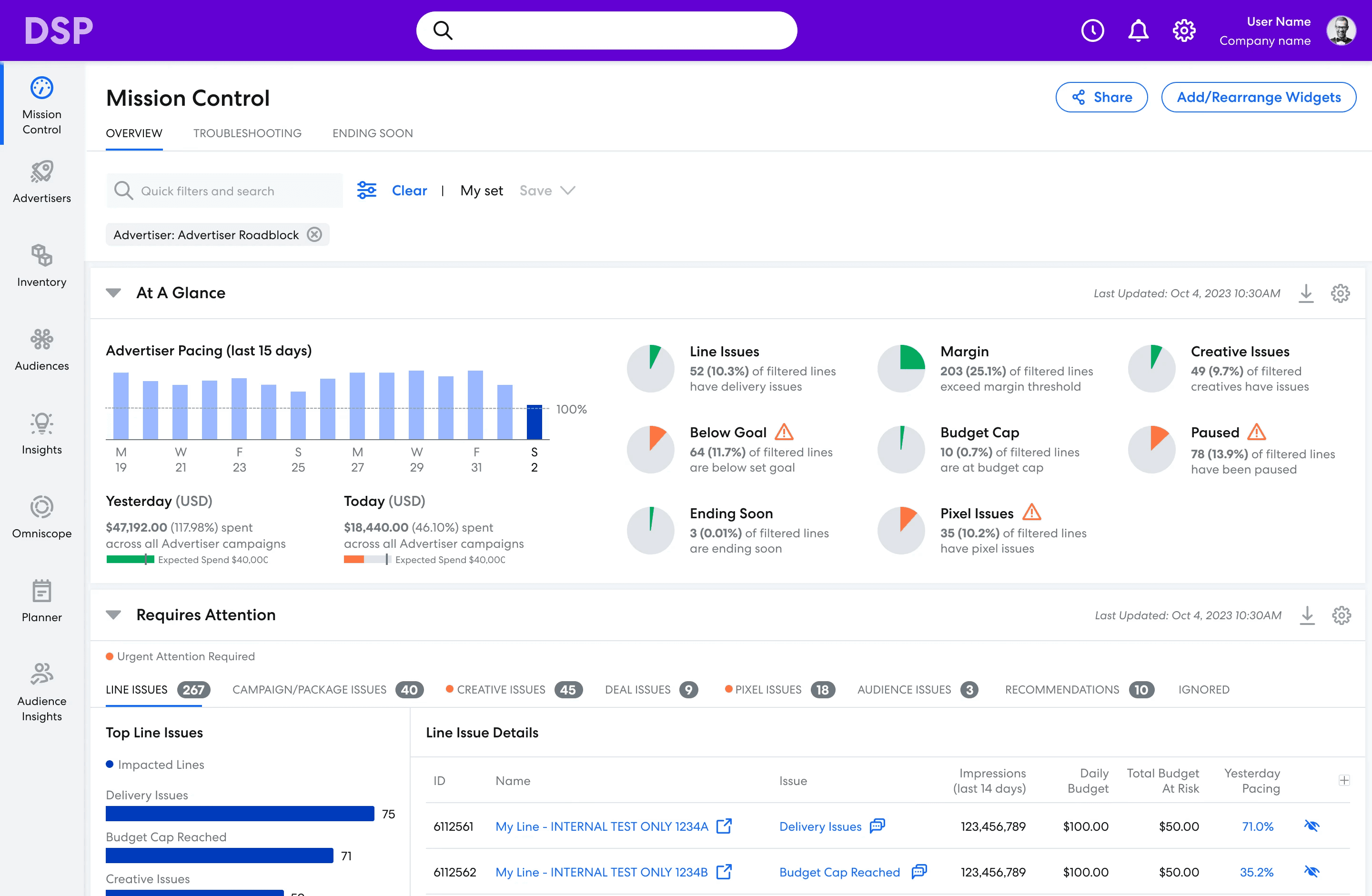
Impact: A new hub for daily workflows
100% of core daily workflows now originate from the new landing page, up from 0%, establishing it as the primary entry point for daily use
4.6x increase in engagement, with 85% of users interacting with landing page content daily (versus 15% previously)
40-60% fewer steps for common workflows, reducing repetitive daily tasks from 5-7 clicks to 1-3.
Old (Pre-existing Design)
New (My Redesign)
My Role
Owned end-to-end design, from research synthesis to final mocks and interaction flows. Mentored a junior designer through early ideation (2020–2021)
Timeline
Design: May 2020 – Aug 2021
(Paused for two years)
Development: Sep 2023 – Dec 2023
Team Size (2020)
2 Designers
1 Product Manager
1 UX Researcher
Team Size (2023)
1 Designer
1 Product Manager
1 UX Researcher
1 Tech Writer
~30 Engineers
The Challenge
Business Problem: High friction and poor first impressions drive user churn
User experience is a retention driver, according to customer surveys.
A high-friction entry point impacts all core workflows, slowing down daily use.
The landing page is the highest-impact surface, shaping expectations for the whole platform.
The old landing page (not my work)
Example User Journey Map that illustrates a few core workflows
User Problem: Landing page doesn't support core workflows
Core tasks are buried in navigation, causing users to bypass the landing page.
Critical data is locked in reports, not surfaced where it’s needed.
A new landing page could streamline daily flows, reducing steps and improving efficiency.
My Solution
Mission Control: A launchpad that keeps users informed and gets them where they need to go
Shows all the information a campaign manager needs upfront with easy-to-read visuals.
Is fully modular and customizable, with the ability to save and share dashboard views.
Provides upfront access to all core platform workflows and guides them towards task completion.
Solving the Workflow Problem
Positions the landing page as the primary entry point for daily use.
Surfaces key metrics upfront, eliminating the need to pull reports to complete core workflows.
See more in the Impact section at the end of the case study.
Feature Highlight: Threshold Customization
Every campaign manager has different criteria for what constitutes an issue. Each widget has fully customizable settings for which issues to show, and when.
Feature Highlight: Threshold Customization
Every campaign manager has different criteria for what constitutes an issue. Each widget has fully customizable settings for which issues to show, and when.
Process Timeline
Initial Research
Interviewed the most active users of our platform to learn how they used the existing dashboard.
Cross-Team Brainstorm
Conducted brainstorm sessions with in-house campaign managers, product, engineering, research, and design.
Early Ideation
Sketches and low fidelity prototypes based off the results of the brainstorm.
Iterative Prototyping
Worked with UX Research team to create mocks, get feedback, improve mocks, get more feedback, improve further… until the final design.
Project Deprioritized
The project was deprioritized August 2021 and went on hiatus.
Project Reprioritized
In September 2023, I was suddenly informed that we were resourced to build this project after all, and by the way, are the designs still good?
Design Refresh
Updated designs to fit new style guide following a recent platform rebrand.
Validation
Reviewed mocks with users to make sure this design still met their needs.
The Finish Line!
After a long, hard road, the design above hit production in December 2023.
Process: Initial Exploration
Key Research Questions
Why isn't the current landing page working for our users?
What would be useful to them, instead?
Initial Research: From quantitative to qualitative
Analytics and surveys revealed friction points, highlighting where users struggled in existing flows.
User interviews explained the "why", uncovering motivations and pain behind the data.
Above: Analytics highlighting the discrepency between page visits (high) and interactions within the page (low)
Below: Survey results revealing that Pacing is the most important metric, found via pulling reports
17
workflows tracked via Pendo
63
surveys on current behavior
9
in-depth user interviews
3
competitive analyses
Key Findings: Core tasks and KPIs poorly surfaced
Users prioritize account health and campaign optimization, making these the most critical tasks on the landing page.
One size doesn’t fit all, as workflows and KPI priorities vary across users.
Existing landing page fails users, surfacing no useful metrics and providing unclear next steps.
Pacing is the most important metric, yet users must navigate elsewhere to access it.
Competitor dashboards use card-based, customizable layouts, highlighting opportunities for a more user-centric design.
Process: Cross-functional Brainstorm
Giving Stakeholders a Voice
Led a cross-functional workshop using a system I developed org-wide, ensuring early alignment across teams.
Participants spanned product and user teams, ensuring diverse perspectives are represented for this high-visibility initiative.
Workshop Agenda: research presentation, idea generation, and concept alignment.
19
TOTAL PARTICIPANTS
3
Product Managers
4
Designers
1
Researcher
5
Engineers
6
Account Managers
Sketch Phase
I translated workshop concepts into sketches, forming the foundation for the concept pitch.
Overall Dashboard Layout
Problem: The existing dashboard is dead space and lacks useful information.
Solution: Interactive card-based view that presents data in an easily-digestible way.
Widgets
Problem: Users are unclear on next steps even after pulling data.
Solution: Widgets tailored to specific use cases with recommendations and clear next steps.
Customization
Problem: Users have wildly different workflows and care about different metrics depending on their campaign properties.
Solution: Allow users to customize their dashboards for different use cases.
Process: Design Iterations
Summary of Design Direction
Starting Assumption: Users value customization and want to build dashboards from the ground up.
Low-fidelity Mocks: Validated layout and customization concepts.
Pivot: Discovered users preferred useful defaults over building from scratch, shifting design focus.
Mid-fidelity Mocks: Refined default widgets to surface actionable metrics and meet core needs.
Interactive Prototype: Reintroduced customization to refine, not define, the experience.
Example Design Evolution: At a Glance Widget
Use Case
Users should be able to tell immediately whether or not their account has issues that require their attention.
What Didn't Work (Iteration 1)
Design Goals: Highlight account health severity, call out issues in red, surface important KPIs and time-sensitive campaigns
Observations: Severity unclear; scannability issues with small labels and numbers; missing pacing info, which is the most important metric for users
What Didn't Work (Iteration 2)
Design Goals: Larger labels, stoplight-colored pie charts for severity (clickable for details), pacing included
Observations: Health meter consumes space without actionable insight; issues not immediately clear; pacing needs more prominence; accessibility concerns with stoplight colors
Final Version
Pacing is now the first thing the eye encounters when scanning the page (positioned in the top left by default)
Issues are a first-class item: Pie charts now represent issue types and can be customized to only display issues a user cares about
Accessibility improvements: Alert icon and contrast improvements reduce reliance on color alone
Example Design Principle: Actionability
Defining Actionability
Problem: Overloaded widgets tried to do too much, effectively recreating full workflows and confusing users.
Solution: Prioritize essential interactions—customization, filtering, and viewing details—while linking out to full workflows for resolution.
Design Principle: Treat the landing page as a hub—surface the issue, clarify it, and link to the workflow to resolve it.
What Didn't Work (Iterations 1 and 2)
Design Goals: Surface account issues and provide tools to fix them
Observations: Early iterations felt busy and lacked clear hierarchy; users confused by too many options
Final Version
Tabbed view: Each list lives in its own tab so users can focus on one area at a time
Issues Detail column gives a single clear recommended course of action for each issue
Extraneous actions stripped away
Example Pivot: Calendar and Audit Log
Designing the Right Widgets
Each widget was intended to solve a core user need; some were discarded or replaced when they didn’t meet that need, as illustrated below.
What Didn't Work (Calendar)
Design Goal: Highlight campaign start and end dates and allow users to drill down to see actions on specific dates
Observations: Interface felt too busy; mental model mismatch (users conceptualize campaigns by budget completion, not by dates)
Final Version (Audit Log)
Familiarity—this is a component that exists elsewhere in the platform; users already refer to it frequently for troubleshooting
Meets user needs—unlike the calendar, the focus is not on how dates are arranged but on the actions taken on each date
Impact
Workflow Impact: Before
Flows required extra steps to navigate to other parts of the platform and manually pull reports
None of the daily core workflows originated on the landing page
Workflow Impact: After
Widgets surface insights and assist navigation, reducing core daily tasks to 1-3 clicks.
All daily core workflows originate on the landing page
Quantifiable Results
85%
of users remain on the Mission Control page when managing their campaigns, compared to 15% previously.
94%
of Mission Control users make use of the Requires Attention widget to view Line Issues
In a follow-up satisfaction survey, users rated Mission Control on average:
83/100
for ease of use
81/100
for speed and responsiveness
78/100
for total user satisfaction
7/7
for Overall Utility
“Definitely the best dashboard of the big four that I've used. I would definitely use it every day. Everything is visually in front of you and you can make quick decisions without having to pull a report.”
“You guys kinda killed this. The dashboard looks fun. I'm such a visual person so I love stuff like this.”
“Oooh I love this. This looks really good compared to what I'm used to. Everything is right there. Anything the system can do that can help troubleshoot and gather as much information as possible in one spot helps us to be more successful.”
What's Next?
The "Top 5 Underperforming Lines" widget was created by a fellow designer and is not my work. The AI Assistant panel, however, is mine.
Mission Control was designed to be scalable. Adding more features to it is a simple matter of creating new widgets.
Before my time with this company came to a close, I was working on an AI assistant that integrated with Mission Control.
You can see a preview of it to the left, and learn more about the process behind it in my AI Workflow Assistant case study!
Go to AI Workflow Assistant Case Study